
Social media has become the backbone of modern marketing. Over 5.1 billion people (62.6% of the global population) now use social platforms, creating an endless stream of content, engagement, and metrics. But here's the problem: manually tracking performance across all these platforms is impossible at scale.
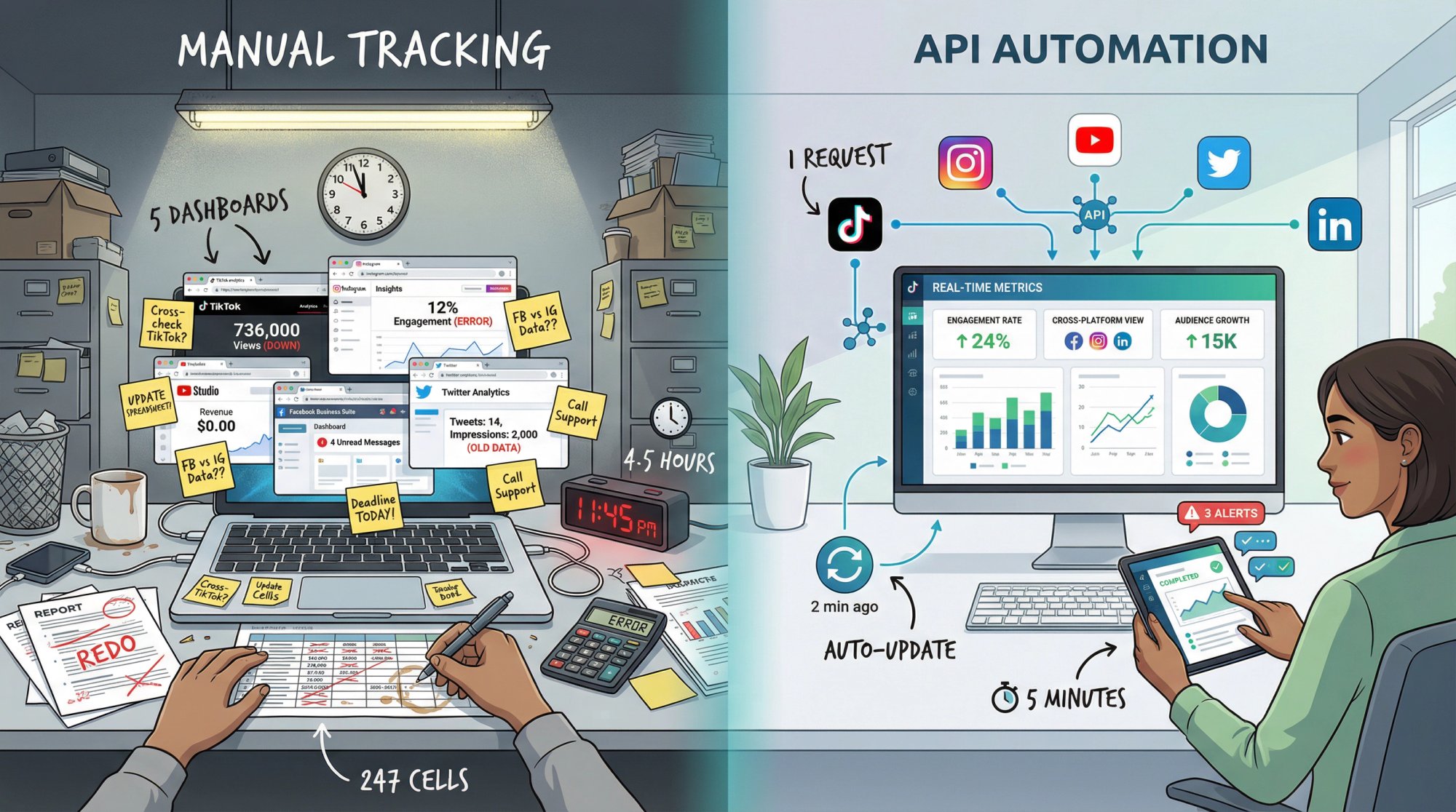
You can't log into five different dashboards every day, copy numbers into spreadsheets, and hope you catch important trends before they fade. Research shows 62% of marketers now rely on social listening and analytics tools to guide their strategy. Without them, you're flying blind.
This is where a social media analytics API becomes essential. It's the difference between spending hours gathering data and spending minutes analyzing it. It's what turns social media from a chaotic flood of information into structured, actionable intelligence.
In this guide, we'll break down everything you need to know: what these APIs actually do, why they matter in 2025, how to choose the right one, and how to implement it without losing your sanity. We'll also share insights from building Shortimize, our cross-platform analytics tool for short-form video.
What Is a Social Media Analytics API?
Think of a social media analytics API as a data pipeline. Instead of manually checking your Instagram followers, YouTube views, and TikTok engagement separately, an API delivers all those numbers directly to your system with a single request.
It's programmatic access to social media performance data. That's the technical definition. In practice, it means your software can automatically pull metrics like follower counts, post impressions, video views, and dozens of other data points without human intervention.
What Data Can You Track?
Account-Level Analytics
You can track follower growth over time, overall engagement rates, posting frequency, and profile performance metrics. Some APIs calculate aggregate scores like virality indicators or audience health metrics from the raw data.
Content-Level Metrics
Every post, video, or story generates its own data. APIs let you pull performance stats for individual pieces of content: which posts got the most engagement, which videos went viral, which formats perform best. You can compare performance across your entire content library.
Multi-Platform Aggregation
Modern analytics APIs aggregate data from multiple networks. Instead of making separate API calls to Twitter, Facebook, Instagram, YouTube, and TikTok, you get standardized data from all platforms through one interface. This creates a single source of truth for your social presence.
We built Shortimize with this principle at its core. Whether you're tracking TikTok, Instagram Reels, or YouTube Shorts, you get the same normalized metrics in the same format. No more reconciling different counting methods across platforms.
Real-Time Access
The best APIs provide real-time data updates. When a post gains traction, when followers spike, when engagement drops… you know immediately. Not tomorrow when you log in to check. Right now.
They also provide historical access, so you can analyze trends over weeks or months, backfill past performance data, and understand seasonal patterns.
Advanced Insights Beyond Raw Numbers
Raw data is just the starting point. Many APIs add layers of intelligence: sentiment analysis on comments, trending hashtag detection, audience demographic breakdowns, anomaly detection that flags unusual performance.
Modern marketing requires more than basic metrics. You need processed insights that help you understand why something performed well, not just that it did.
How APIs Work (Behind the Scenes)
Social media monitoring APIs typically aggregate data from multiple sources, eliminating the need to manually log into each platform. You make an HTTP request with your API credentials. The API queries the relevant platforms, normalizes the data into a consistent format, and returns structured JSON or XML.
Automation is the key benefit. Set up a script that runs every hour, every day, or in response to specific triggers. Your system automatically collects fresh data, stores it, and makes it available for dashboards, reports, or alerts. No human needs to remember to check anything.
This is why APIs are the backbone of modern social media management platforms. They're also increasingly essential for product teams who want to integrate social metrics with their broader analytics stack.
Why Your Team Needs a Social Media Analytics API
Building an API integration requires real engineering effort. So what makes it worth the investment?
⚡ Speed Wins in Social Media
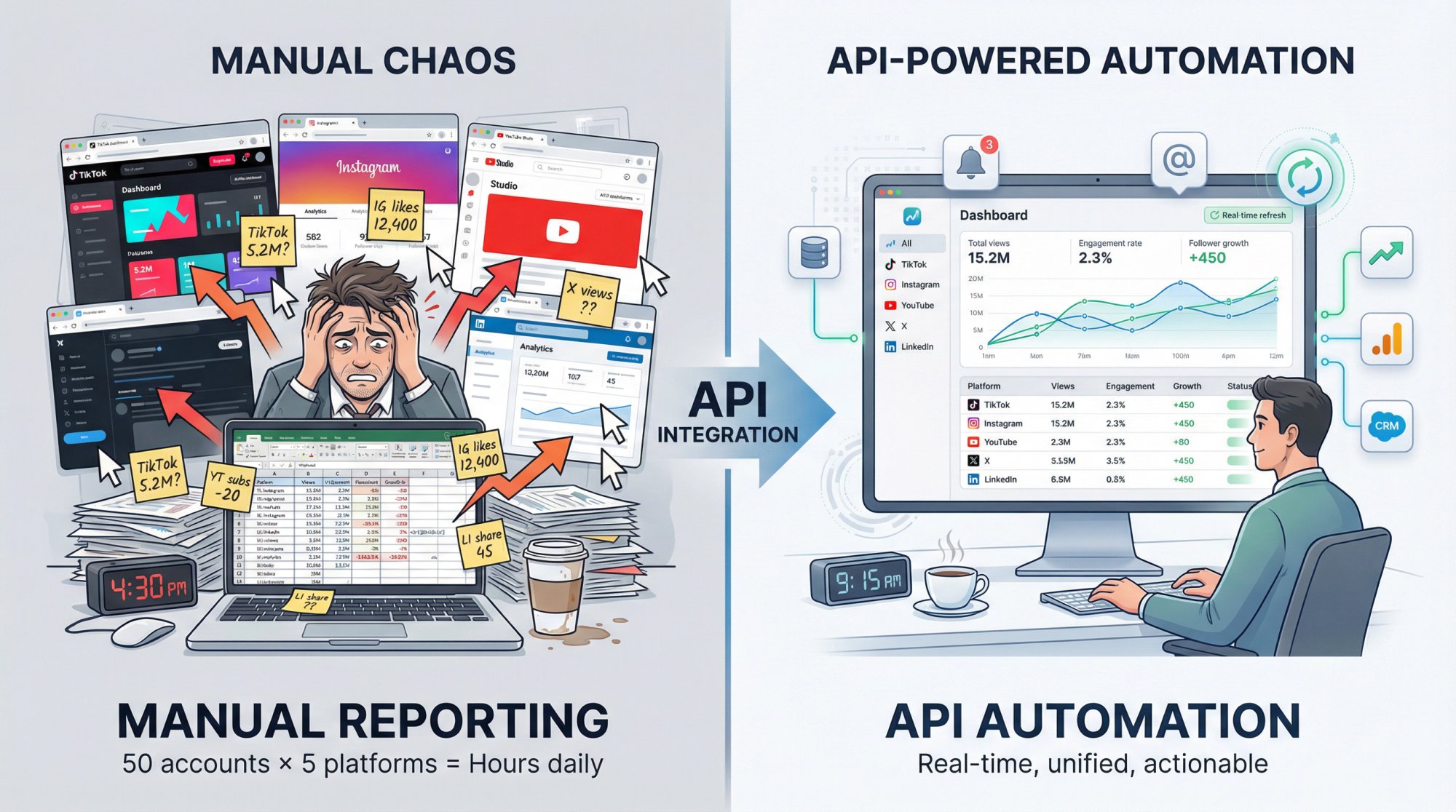
Social media trends move fast. A post can go viral in two hours and be forgotten by evening. APIs provide real-time data access that lets you catch these moments while they matter.
When an important tweet starts trending, when a TikTok breaks through, when a competitor's campaign takes off… you know immediately. You can amplify, respond, or adjust your strategy in minutes, not days.
Weekly reports don't cut it anymore.
By the time you see last week's numbers, the opportunity is gone. Real-time access through an API is the only way to stay competitive.
📊 How to Compare Performance Across Platforms
Most brands operate on multiple social networks. But each platform has its own analytics dashboard, its own metrics, its own quirks. Social media analytics APIs aggregate this fragmented data into one unified view.
You can finally compare performance across channels. Which platform drives the most engagement for a specific content type? Are your Instagram Reels outperforming YouTube Shorts? Is your audience more active on TikTok or Twitter? These questions become answerable.
We see this constantly with Shortimize users. They track the same content concept across TikTok, Reels, and Shorts simultaneously, then identify which platform resonates most with their audience. That insight is impossible when you're bouncing between three separate apps.
⏰ Time Savings at Scale
Let's be honest about the alternative. Manually pulling reports means:
• Opening each platform's dashboard
• Filtering to the right date range
• Downloading CSVs or copying numbers
• Pasting into a master spreadsheet
• Repeating for every account you manage
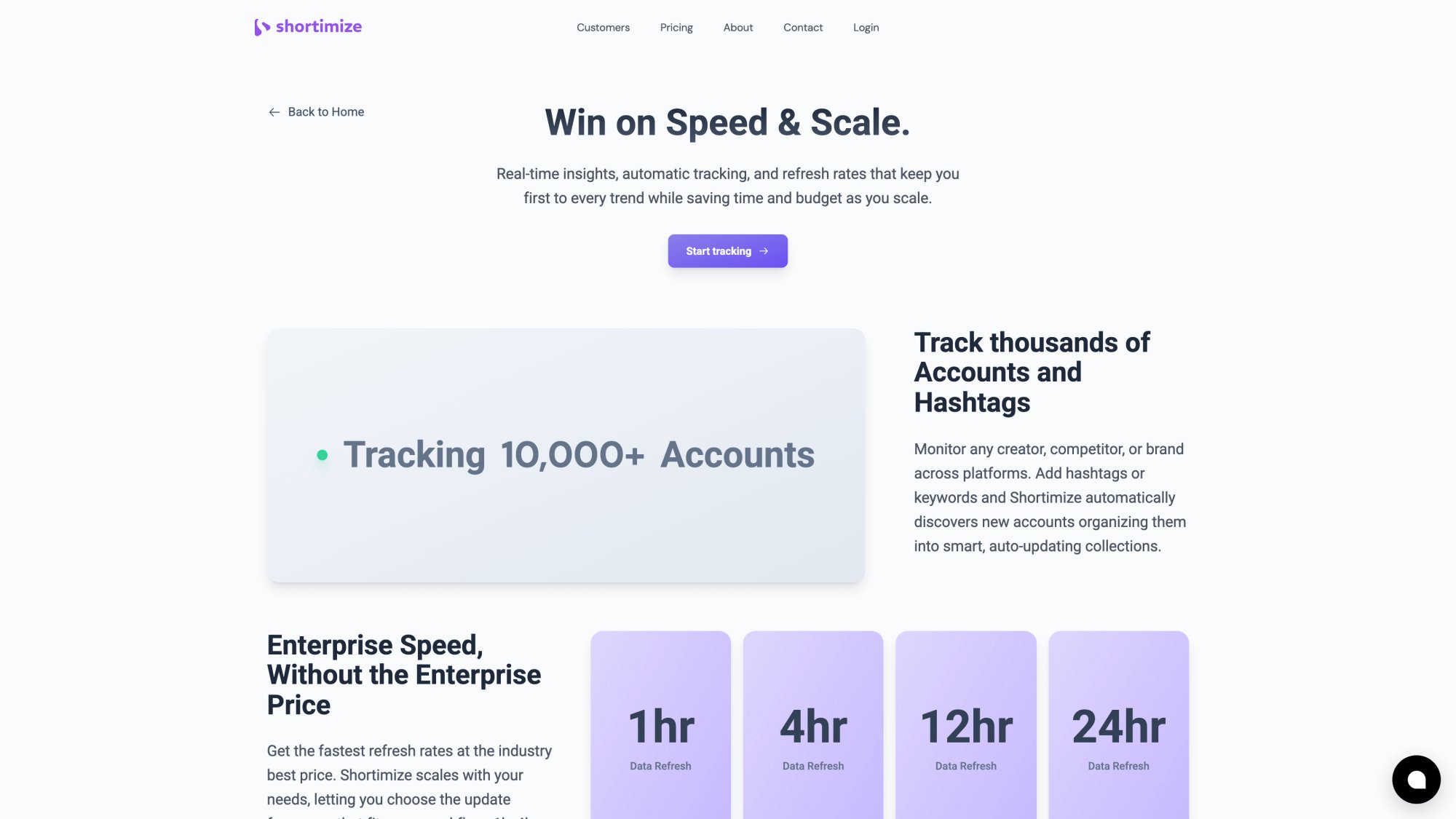
For an agency tracking 50 accounts across 5 platforms, that's hours of work every single day. Work that a human doesn't need to do.
APIs automate this entire workflow. Once it's set up, the data flows automatically. Your team focuses on analysis and strategy instead of data collection drudgery. Plus, automation eliminates copy-paste errors that corrupt manual reporting.
📈 Custom Analytics on Your Terms
Platform-native dashboards show you what they think matters. But what if you need different metrics? What if you want to calculate engagement rate your own way, or create custom segments, or track metrics the platform doesn't even surface?
With an API, you get the raw data. You can calculate any KPI you want, consistently across all platforms. Want to compare "engagement per follower per post" for Reels versus TikToks? Build it. Want to track "viral coefficient" or "content decay rate"? It's your data now.
This flexibility is critical for sophisticated marketing teams who need more than basic metrics to optimize performance.
🔗 How to Integrate Social Data with Your Business Stack
Modern marketing data doesn't exist in isolation. You need social metrics alongside web analytics, sales data, customer support tickets, and product usage patterns.
APIs let you integrate social analytics into your broader business intelligence ecosystem. Feed the data into your data warehouse. Include it in company dashboards in Tableau or Power BI. Correlate social engagement with lead generation in your CRM.
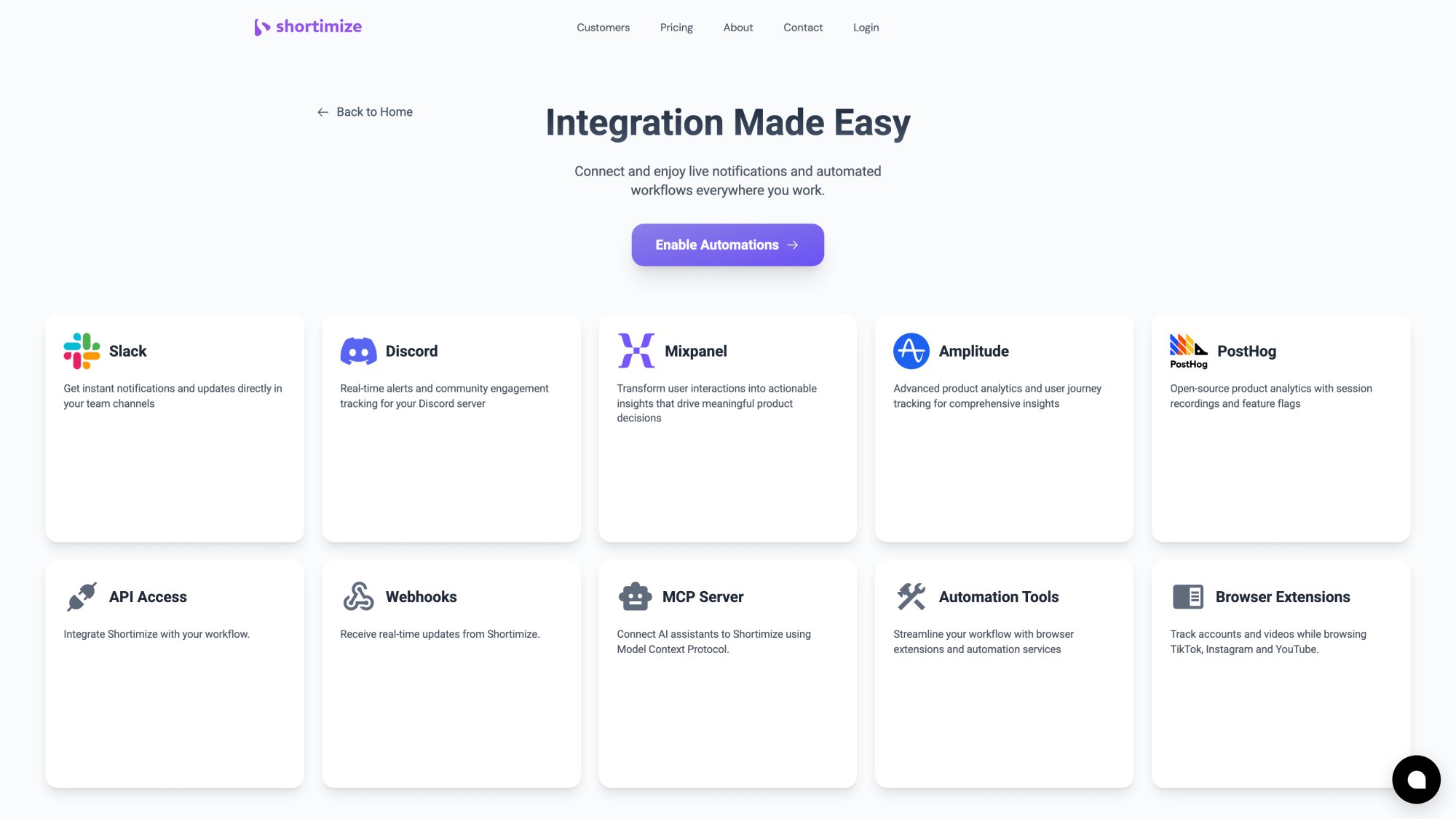
At Shortimize, we built native integrations with product analytics platforms like Mixpanel, Amplitude, and PostHog. This means teams can see how social video performance correlates with app installs, user activation, or retention. That's impossible without API access.
🔔 How to Set Up Automated Alerts and Actions
Many monitoring APIs support webhooks that push notifications when certain conditions are met. You can set up alerts for:
• A post hitting 10,000 views in the first hour
• A competitor's engagement spiking
• Negative sentiment trending in your mentions
• A keyword appearing 100+ times in an hour
These real-time alerts can be game-changers for PR, customer support, and community management. You catch opportunities and crises early, when you can still do something about them.
Social media analytics APIs transform data collection from a labor-intensive manual process into an automated, real-time, integrated system. In 2025, if you're serious about social media, an API isn't optional. It's infrastructure.
Official Platform APIs vs Third-Party Solutions
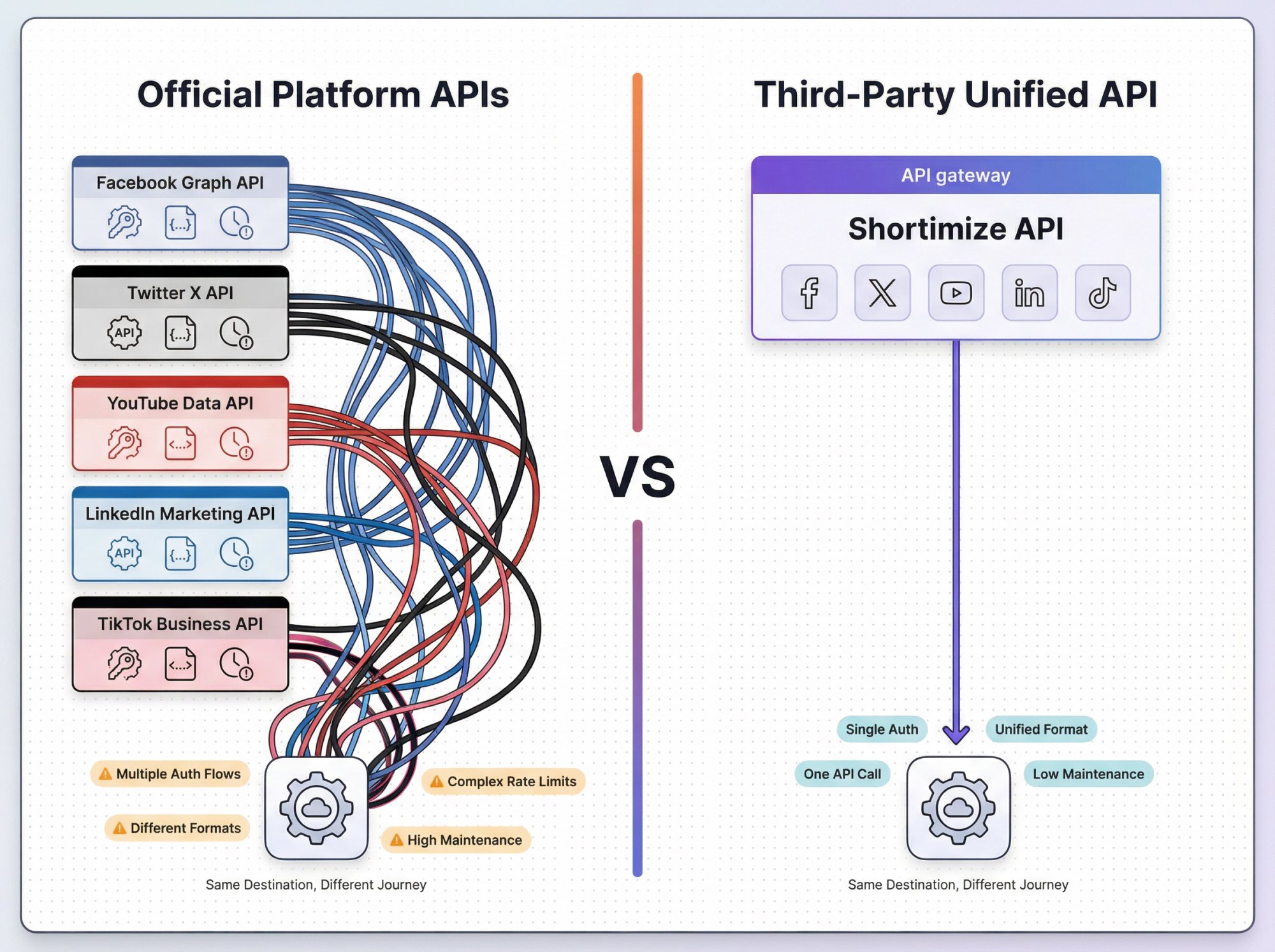
When you decide to use a social media analytics API, you have two paths: use each platform's official API, or use a third-party service that aggregates data for you. Understanding the differences is crucial because they affect what data you can actually get.
Official Platform APIs: Powerful but Limited
Every major social network offers its own API. Facebook has the Graph API (covering Facebook and Instagram). Twitter has the X API. YouTube has its Data API. LinkedIn offers the Marketing API. TikTok has various APIs including Business and Research tiers.
These official APIs are the source of truth. But they come with significant restrictions:
You Can Only Access Your Own Accounts
Official APIs typically only let you access data for accounts you manage or have explicit permission to access. Want to benchmark against competitors? Track influencer performance? Monitor industry trends?
You can't do that with official APIs.
Instagram's API won't let you pull another account's insights. LinkedIn won't give you competitor page stats. Facebook restricts data access to business accounts you own. Privacy guardrails (some reasonable, some frustrating) block competitive intelligence use cases.
Twitter is a partial exception since tweets are public, but as of 2023, Twitter moved to a paid tier model with expensive plans even for basic access. The Basic tier costs $100/month, and full firehose access requires the $5,000/month Pro tier.
Partial Metrics and Permission Labyrinths
Even for accounts you own, official APIs often don't expose all metrics. Some analytics stay locked in native dashboards only. Instagram recently changed its API to report "video views" instead of "impressions" for all content, forcing tools to adapt.
Facebook's Graph API requires a detailed app review process for anything beyond basic data. After Cambridge Analytica, Meta locked down data access severely. Getting permissions now involves lengthy reviews, and if your use case doesn't fit their approved categories, you simply won't get access.
Rate Limits and Complexity
Each official API has different rate limits, authentication flows (OAuth for some, API keys for others), data formats, and quirks. Integrating directly with multiple platforms creates significant backend complexity. Three different auth systems, three rate limit schemes, three data formats… and it's hard to maintain and slow to adapt when platforms change things.
YouTube uses a quota point system where each request type costs different amounts against your daily limit. Twitter's API has strict monthly quotas even on paid tiers. Without careful design, you'll hit these limits regularly.
What Data Isn't Available in Official APIs
This is the biggest limitation. Certain metrics simply aren't provided, for privacy or business reasons.
Instagram and Facebook don't provide analytics for personal profiles via API. They also don't allow retrieving follower or following lists for other accounts. LinkedIn won't give you competitor metrics. Competitor reach and impressions are not provided by any official API.
Historical data has limits too. Twitter's API might not let you pull very old tweets except on enterprise tiers, and even then, very active accounts may only show recent weeks.
Stories analytics, audience demographics for competitors, private account metrics: all off-limits by design. Even stitching together every official API still leaves major gaps.
Third-Party Unified APIs: Convenience and Breadth
This is why organizations turn to third-party analytics services with their own APIs. Companies like Brandwatch, Meltwater, Sprout Social, and specialized tools like Shortimize gather social data (via official APIs, partnerships, or alternative methods) and provide a single unified API to access it all.
| Aspect | Official Platform APIs | Third-Party Unified APIs |
|---|---|---|
| Integration Complexity | Multiple auth flows, formats, rate limits | Single API, one auth, unified format |
| Competitor Data | Not available | Often available via estimation or scraping |
| Data Coverage | Only owned accounts | Public data across accounts |
| Maintenance Burden | High (you handle platform changes) | Low (provider handles updates) |
| Cost | Often free (with limits) | Subscription-based |
| Support | Multiple channels (varying quality) | Single vendor support |
One API to Rule Them All
Instead of integrating with five platforms, you integrate with one API. The provider handles the messy differences between networks. They keep their connectors updated when platforms change, minimizing maintenance on your end.
You hit one endpoint, get a clean unified response. Shortimize returns standardized metrics whether a video is from TikTok, Instagram Reels, or YouTube Shorts, making cross-platform comparison trivial.
This "single unified data format" approach dramatically reduces integration complexity. Instead of three auth flows and three data schemas, you get one consistent interface.
Access to Data Not Exposed Officially
Third-party services often use alternative methods to gather data that official APIs don't provide. Some scrape public information (within legal bounds), leverage partner agreements, or use data science to estimate metrics.
They can show you a competitor's engagement rate, estimated reach, or historical follower growth even when official APIs don't offer it. They fill gaps through estimation or third-party data sources.
No tool can magically break platform rules (competitor Stories insights remain impossible), but they push boundaries to provide the most complete picture possible. Shortimize tracks public TikTok, Reels, and Shorts data without requiring account login, something TikTok's official API wouldn't allow for regular developers.
One Support Channel Instead of Five
Instead of dealing with each platform's developer support (quality varies wildly), you have one vendor. If something returns weird data, they figure out whether it's a Twitter quirk or Facebook bug. You don't.
Enterprise-focused services provide account managers and support contracts. For teams without deep API expertise, this support can be worth the subscription cost alone.
Value-Added Analytics
Third-party platforms often build analytics on top of raw data. Brandwatch uses NLP for sentiment tagging. Talkwalker calculates impact scores. Shortimize detects outliers by comparing video performance to median benchmarks, automatically flagging viral content.
These derived metrics and AI-driven insights save you from building your own analytics logic. The API doesn't just return platform data; it gives you enhanced intelligence the platform itself doesn't provide.
The Trade-Off: Cost and Trust
Third-party solutions cost money (obviously) and require trusting an external provider with your data access. Enterprise APIs like Brandwatch or Talkwalker can run tens of thousands per year. Even developer tools have premium tiers around $149+/month for analytics features.
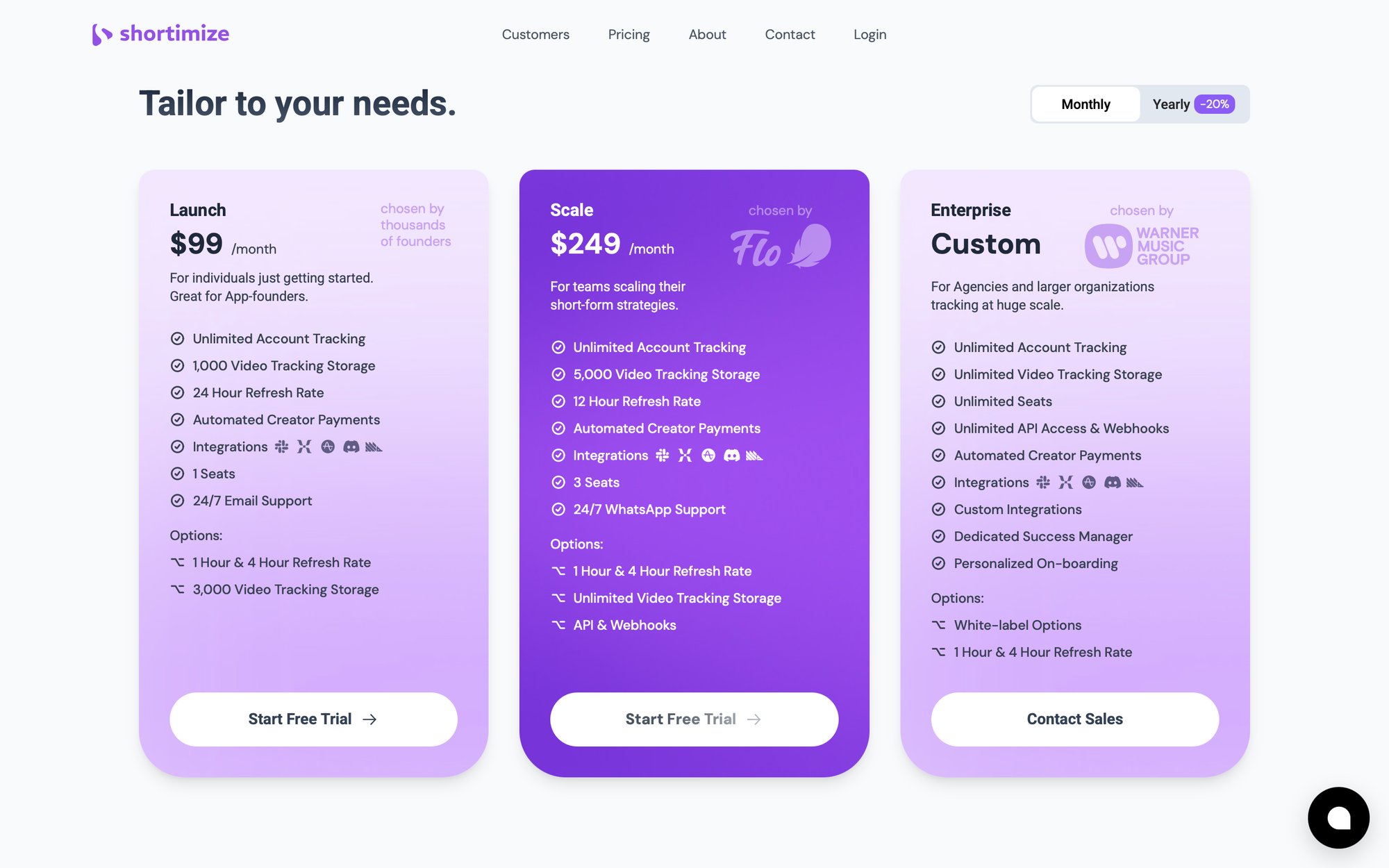
But more affordable options exist. Shortimize pricing starts at $99/month for Pro plans, with transparent pricing for different team sizes and data volumes. The range is huge: $50/month to $5,000+ depending on data volume and capabilities.
Evaluate the pricing model carefully: per account? Per mention? Per data volume? Understand how costs scale before committing.
Which Should You Choose?
Official APIs make sense if:
→ You only need data for your own accounts
→ You have engineering resources to maintain multiple integrations
→ 100% compliance with platform ToS is critical
→ You're okay with data gaps
Third-party unified APIs make sense if:
→ You need competitive intelligence or benchmarking
→ You want cross-platform aggregation without engineering overhead
→ You value speed of implementation over cost
→ You need data that official APIs don't expose
Most mature social media teams use both. Pull what you can from official APIs for owned accounts, but leverage third-party solutions for competitive analysis and multi-network rollups that would be painful to build alone.
As one platform noted, platforms are becoming more restrictive (like Twitter's API changes), not less so. This trend means third-party aggregators will continue playing a vital role in providing accessible analytics.
What to Look for When Choosing an API

Not all social media analytics APIs are created equal. Here's what to look for when evaluating options:
✅ Platform Coverage
Does it support the networks you actually use?
Some APIs specialize (Shortimize focuses specifically on TikTok, Instagram Reels, and YouTube Shorts). Others aim for broad coverage (Brandwatch, Meltwater include everything from Twitter to Reddit to news sites).
List your must-have platforms:
• Facebook, Instagram, X (Twitter)
• LinkedIn, YouTube, TikTok
• Snapchat, Reddit, Pinterest
• Emerging platforms (Threads, Bluesky)
Verify the API covers all major networks you use for a truly holistic approach.
Also consider emerging platforms. If Threads, Bluesky, or other new networks matter to you, check if the provider adds support for new platforms quickly. Don't create blind spots.
📊 Metrics Depth
What specific data points are available for each platform? Do you get just high-level stats (followers, likes), or granular analytics (reach, impressions, watch time, demographics)?
Critical questions:
• Can I get Instagram Story views?
• Does it provide Twitter engagement rate?
• Can I track YouTube subscriber growth over time?
• Are there aggregated insights like sentiment analysis or influence scoring?
Look for historical data access. Can the API fetch last year's data, or only current stats? Some third-party APIs store historical metrics, enabling time-series analysis.
Accuracy and reliability are paramount. Read case studies if available to see if users trust the data quality.
⏱️ Update Frequency
How often does data refresh? Different tools offer different rates. Shortimize refreshes tracked videos every 12-24 hours by default (with 1-hour refresh available for enterprise).
If you need real-time or near-real-time updates, ensure the API provides it. Some only update daily, which might be too slow for time-sensitive campaigns.
Also consider latency. When you request data, how fast is the response? Live dashboards need fast APIs. Large enterprise systems querying massive databases might have noticeable lag.
📚 Documentation Quality
Comprehensive, clear API documentation is essential. Strong docs signal a mature product. Look for:
• Code examples in multiple languages
• Detailed endpoint explanations
• Parameter descriptions
• Error code references
• Rate limit specifications
Modern REST/JSON APIs are standard. Some may offer GraphQL or gRPC. Check if there are webhooks for push notifications, which simplify getting updates.
Choose an API with thorough documentation and reliable support. Support quality matters when you hit implementation snags.
🚦 Rate Limits
Every API imposes limits. Examine the quotas: X calls per hour? Y data points per month? Are those limits sufficient for your needs?
Important considerations:
• If tracking 1,000 profiles, can the API handle that volume?
• Do they offer batch endpoints for efficient data retrieval?
• What happens when you exceed limits?
• Can you request increases or upgrade tiers?
Design your integration to handle rate limiting gracefully. Implement backoff and retry logic. Spread requests over time when possible.
🔒 Security Standards
Security isn't optional. Look for:
• HTTPS encryption for data in transit
• Encryption at rest for stored data
• GDPR/CCPA compliance
• Data Processing Agreements
• SOC 2 or ISO 27001 certifications (for enterprise providers)
If you're connecting your own accounts, the API provider needs secure token storage. They should only do what you explicitly permit, nothing more.
Data security is a top priority. Ensure providers address it through secure protocols and regulatory compliance.
💰 Pricing Transparency
Pricing models vary wildly:
• Per profile tracked
• Per mention or data point
• Per seat
• Per data refresh frequency
• Flat rate bundles
Align the model with your needs. Per-profile pricing can explode for agencies. Flat rates work better for high-volume tracking.
Watch for hidden costs:
• Overage charges
• API access fees (separate from base subscription)
• Extra costs for historical data
• Fees for additional integrations
Transparent pricing about plans and additional costs avoids unpleasant surprises. Calculate ROI: if a $500/month API saves 40 hours of manual work, it's probably worth it.

Most vendors offer free trials or demos. Use them to gauge actual value before committing.
🔌 Integration Options
How will you actually use the data?
• Direct code integration
• CSV/Excel export
• Data warehouse connectors
• BI tool integrations (Tableau, Power BI, Google Data Studio)
• Native integrations with product analytics platforms
• Webhooks for automated notifications when videos go viral
• Low-code connectors (Zapier, Make, etc.)
A rich ecosystem around the API (connectors, integrations, SDKs) signals it's built to plug into various workflows.
🎯 Query Flexibility
Can you request exactly the data you need?
• Field selection (only fetch specific metrics)
• Filtering capabilities (new posts since last check)
• Date range queries
• Keyword or hashtag tracking
• Custom groupings or tags (label profiles as "Competitor" vs "My Brand")
Flexible querying minimizes data transfer, reduces processing overhead, and optimizes API usage against quotas.
How to Implement a Social Media Analytics API
Once you've chosen an API, here's how to actually implement it:
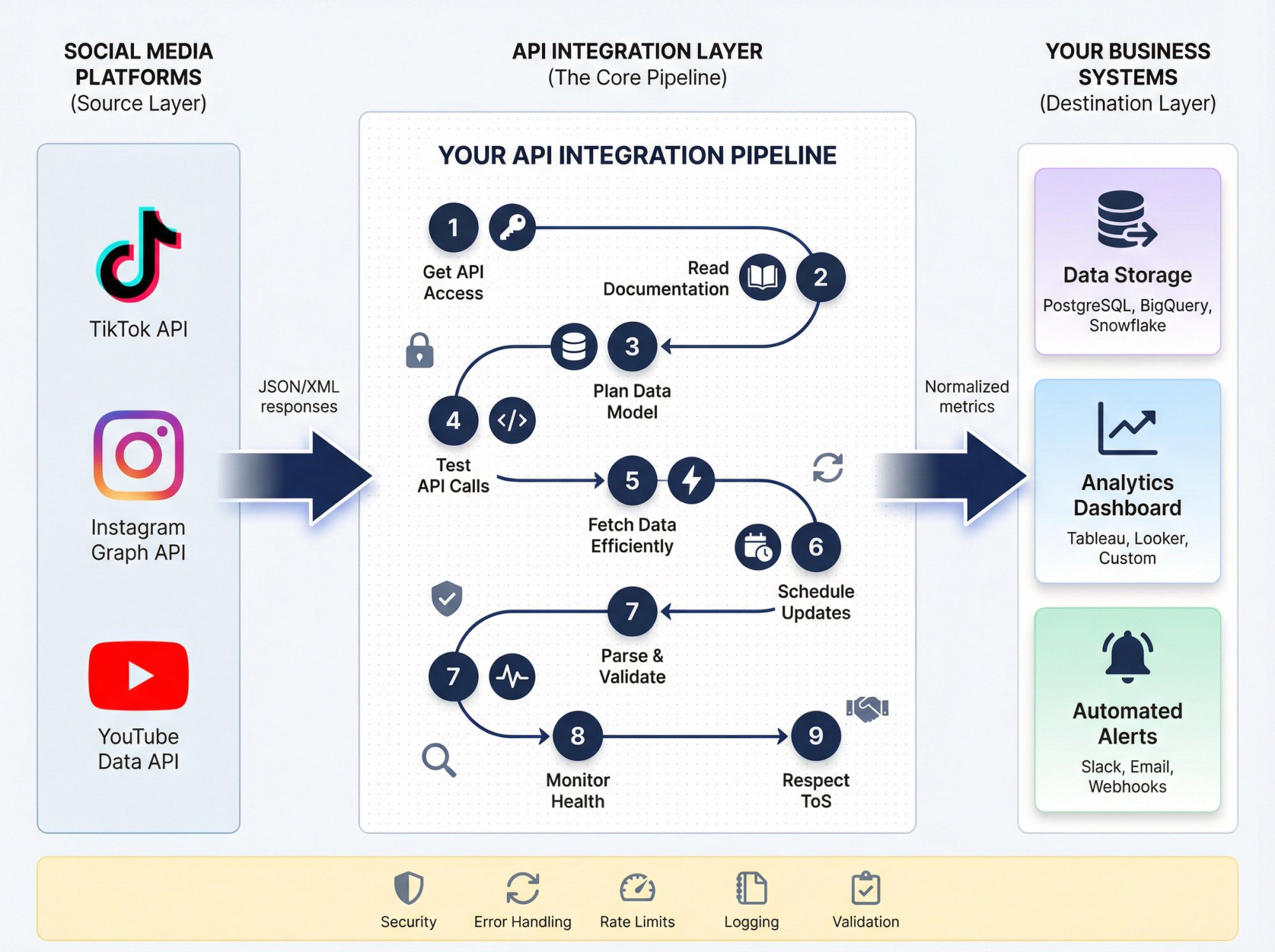
① Get API Access
Register and obtain API credentials (typically an API key or OAuth token). For third-party platforms, sign up for an account, subscribe to the appropriate plan, then generate credentials in your dashboard.
Treat API keys like passwords. Never expose them in client-side code. Store them securely using environment variables or secrets managers.
② Read Documentation and SDKs
Skim the docs to understand:
• Which endpoints provide what data
• Required vs optional parameters
• Authentication methods
• Response formats (usually JSON)
• Rate limits and quotas
If the provider offers SDKs or client libraries in your language, use them. They handle authentication, pagination, and boilerplate code for you.
③ Plan Your Data Model
Decide how you'll store incoming data. Options:
• Database (SQL or NoSQL)
• Data warehouse (Snowflake, BigQuery)
• Spreadsheet (Google Sheets, Excel)
• Direct to BI tool
Design a schema that makes sense for your use case. If merging data from multiple platforms, create unified tables (e.g., a posts table with columns for platform, likes, comments, etc.).
④ Write and Test API Calls
Start simple. Make a test request to fetch your own profile info. Verify authentication works.
Implement robust error handling:
• Invalid tokens (refresh if needed)
• Rate limit errors (HTTP 429)
• Network timeouts
• Transient failures
APIs often have rate limits. Implement retry with exponential backoff (wait 1s, then 2s, then 4s, etc.).
Many APIs include headers showing remaining quota. Monitor these to avoid hitting limits.
⑤ Fetch Data Efficiently
Use batch requests when possible. Some APIs let you request multiple items in one call (e.g., Twitter can retrieve 100 tweets per request). This is faster and kinder to rate limits.
If batching isn't available, be mindful not to hammer the API too fast. Respect rate limits.
⑥ Schedule Regular Updates
For continuous monitoring, set up automated data retrieval:
• Cron jobs running scripts every N hours
• Webhooks that push notifications when events occur
• Event-driven triggers based on thresholds
Balance frequency with rate limits. Core metrics might refresh hourly, while audience demographics update daily (they change slowly).
⑦ Parse and Validate Data
When data arrives, parse JSON into your data structures. Validate it makes sense. Do spot checks against native platform dashboards early on.
Handle null or missing fields gracefully. Some metrics might not apply to all content types (e.g., "shares" might be null for platforms without sharing).
Timestamp handling is crucial. Ensure consistent timezone handling (normalize to UTC) for time-series analysis.
⑧ Monitor Integration Health
After deployment, watch for:
• Failed API calls
• Changes in data patterns
• Approaching rate limits
• Errors or anomalies
Subscribe to provider status pages and change notifications. Log responses (at minimum, log errors) for troubleshooting.
Review usage dashboards periodically. Catch issues like accidental infinite loops or sudden data volume spikes before they cause problems.
⑨ Respect Terms of Service
Use data in compliance with:
• API provider terms
• Platform policies
• Privacy laws (GDPR, CCPA)
Most APIs prohibit using data to build competing services or reselling raw data. If handling user data, implement deletion capabilities if users request it.
Best Practices Summary
| Practice | Why It Matters |
|---|---|
| Secure credential storage | Prevent unauthorized access |
| Error handling with retries | Ensure reliability |
| Rate limit monitoring | Avoid service interruptions |
| Data validation | Catch issues early |
| Logging | Enable troubleshooting |
| Caching (when appropriate) | Reduce API calls, improve performance |
| Stay updated on API changes | Avoid breaking integrations |
By following these practices, you'll build a robust pipeline that delivers high-quality social data reliably with minimal maintenance.
Common Challenges (And How to Solve Them)
Social media analytics APIs are powerful, but they're not perfect. Here are the main challenges and how to address them:

📉 Data Gaps Are Inevitable
No API gives you everything. Instagram Stories analytics for competitors are impossible to fetch. Hidden like counts can't be pulled. Competitor impressions aren't available. TikTok audience demographics are extremely limited.
How to handle this:
Identify "must-have" vs "nice-to-have" metrics upfront. If something isn't accessible, use proxy metrics or estimates. Many tools provide estimated values based on benchmarks. Use these directionally, not as gospel.
Focus on what you can measure (which is still a lot) rather than lamenting what you can't.
🎯 Accuracy and Platform Changes
Platforms redefine how they calculate metrics. YouTube might change view counting. Twitter might redefine impressions. Instagram recently changed how it reports video metrics.
Small discrepancies between API responses and live app numbers can occur due to caching or timing. YouTube often finalizes view counts after filtering spam, so immediate pulls might undercount.
How to handle this:
Stay subscribed to provider announcements about metric changes. For critical metrics (like ad spend), always double-check with official reports. Accept that minor numerical differences are normal.
⚠️ Rate Limit Management
Hitting quotas is common. If you suddenly need to analyze 100 new accounts, you might run into limits.
How to handle this:
• Monitor usage proactively (don't wait for 429 errors)
• Track rate limit headers in API responses
• Implement backoff logic automatically
• Reach out for quota increases when needed
• Consider upgrading plans if consistently hitting limits
Maintain different API keys for different systems to avoid one heavy process starving others.
🔧 Integration Complexity
Different platforms use different identifiers (numeric IDs vs strings vs handles). Time zones vary (UTC vs PST). Date formats differ.
How to handle this:
• Maintain mapping tables (your internal ID → platform IDs)
• Normalize timestamps to UTC in your database
• Standardize date formats on ingestion
• Use unified APIs when possible to reduce complexity
If DIYing with official APIs, budget time for reconciling these differences. It's tedious but necessary work.
⚖️ Legal Compliance
Twitter's policy might restrict storing tweet data longer than X days. Facebook requires deleting data for users who revoke permissions. GDPR means EU users can request data deletion.
How to handle this:
• Read terms of service carefully
• Implement data retention policies
• Build deletion capabilities
• Aggregate data when possible (less personally identifiable)
• Stay on the right side of both law and platform rules
💸 Cost Management
APIs that start cheap can become expensive at scale.
How to handle this:
• Monitor ROI continuously
• Trim unnecessary data collection
• Reduce frequency for less critical metrics
• Pause tracking for accounts not providing value
• Align collection with clear objectives
Don't pay for data "just because" without a plan to use it.
🤔 Ethical Considerations
Using social data at scale raises ethical questions. Anonymize where appropriate. Be cautious with automated sentiment analysis (it can misclassify). Use insights fairly, not manipulatively.
How to handle this:
• Self-audit your data use regularly
• Consider privacy implications
• Don't publish data that violates platform terms
• Be transparent about how you use social intelligence
With growing scrutiny on data use, being ethical isn't just right; it's smart business.
Every tool has limitations. The key is understanding them upfront so you can plan accordingly. The benefits (speed, scale, insight depth) far outweigh the challenges when you manage them proactively.
The Future of Social Media Analytics APIs
How will these APIs evolve? Here's what we see coming:
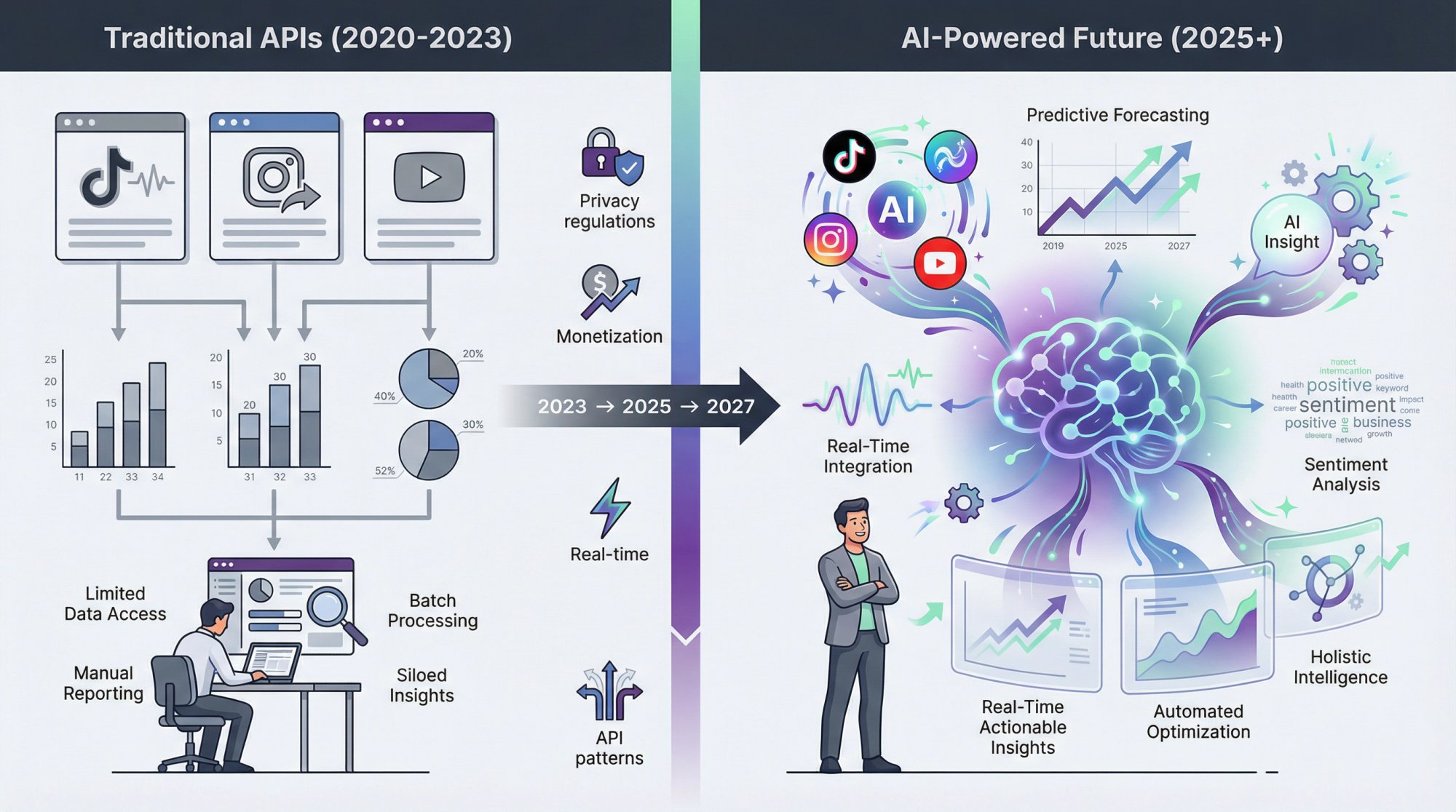
🤖 AI-Powered Intelligence
The future lies in seamless integration of AI and machine learning. We're moving beyond raw data to predictive analytics.
Imagine an API that:
• Forecasts post performance based on the first hour
• Predicts audience growth trends
• Suggests optimal content topics using AI
• Attributes engagement drivers automatically
This shift is already happening. APIs will increasingly provide foresight, not just hindsight.
🌐 New Platforms and Formats
TikTok barely existed five years ago. Now it's essential for marketers. New platforms will emerge (AR/VR social experiences, next-gen content formats).
APIs will need to adapt quickly. Expect more consolidation and standardization efforts. The industry may push for unified data schemas across platforms.
🔐 Privacy-First Design
Data privacy regulations are tightening. Platforms may create privacy-safe analytics APIs providing aggregated insights without exposing personal data.
This balances utility with compliance, a trend we expect to accelerate.
💰 Access May Tighten Further
Twitter's drastic API cutback in 2023 is a warning sign. Other platforms may follow suit, monetizing data access more aggressively.
Companies will need to budget for analytics APIs as a standard cost, like cloud hosting. Third-party aggregators become even more crucial when direct access is expensive or restricted.
On the flip side, regulations like the EU's Digital Services Act may push for more transparency, potentially leading to richer public data or research APIs.
⚡ Real-Time and Streaming
Content is becoming more interactive and ephemeral (live audio, disappearing Stories, live stream comments). Analytics APIs will need to capture transient data in real-time.
Expect more websocket or streaming endpoints for continuous monitoring. Alerting mechanisms will improve as demand for instant notifications grows.
🏗️ API Gateway Patterns
Large enterprises may build their own "meta-API" combining multiple sources (official and unofficial) into a custom unified feed. This reduces vendor dependence and provides full control over data handling.
The concept of using an API gateway to combine social APIs will gain traction among resource-rich organizations.
Making Your Decision
Social media isn't slowing down. Neither is the need to measure it effectively. A social media analytics API transforms how you understand and leverage your social presence.
What you get:
• Real-time monitoring instead of weekly reports
• Cross-platform insights instead of siloed dashboards
• Automated data collection instead of manual spreadsheet work
• Custom analytics instead of limited native metrics
• Integration with your broader business intelligence
The workflow becomes:
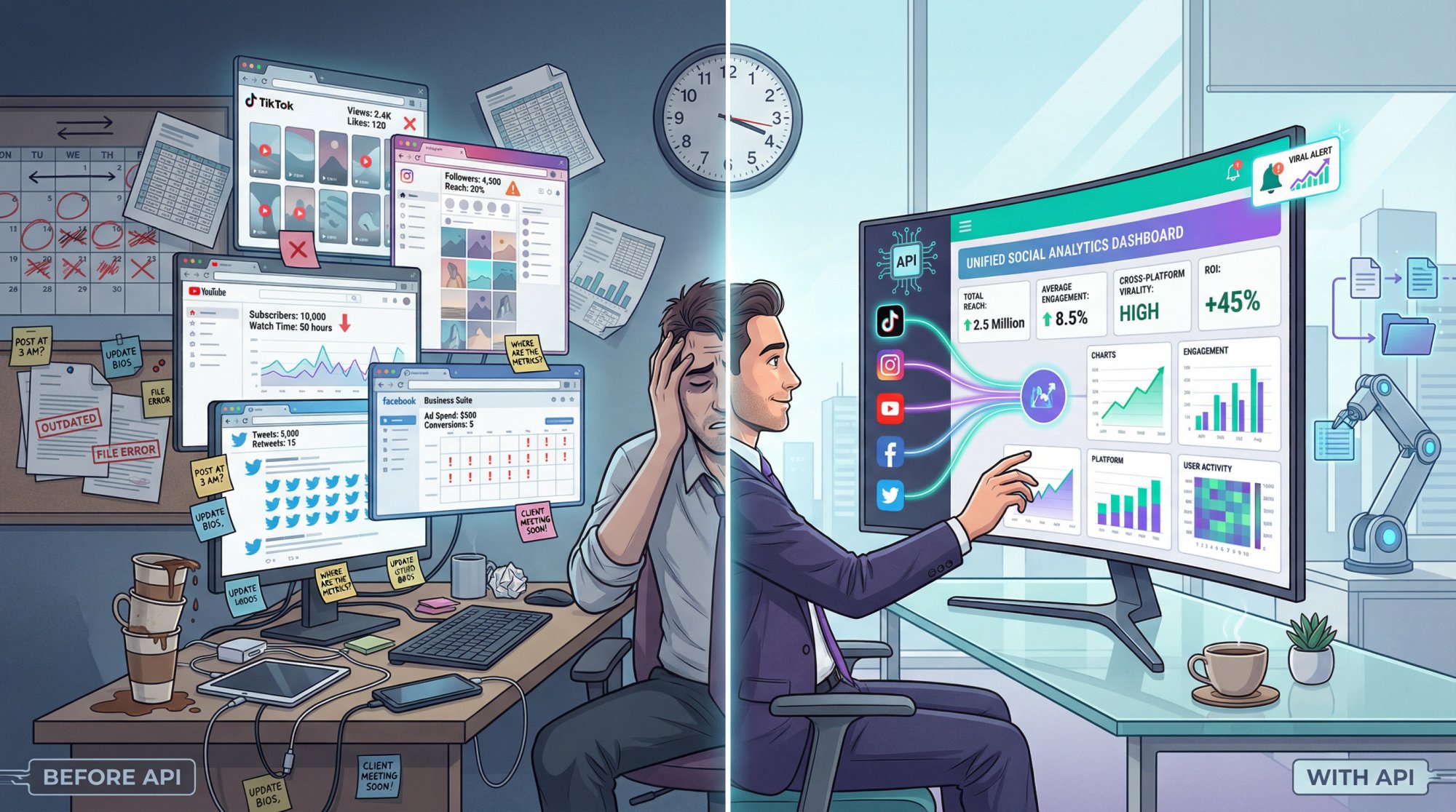
Instead of logging into five platforms, copying numbers, updating spreadsheets, and hoping you catch trends, you have automated data flowing into your systems, alerts firing when important things happen, and dashboards updating in real-time.
That's the transformation. From manual chaos to automated intelligence.
That's the transformation. From manual chaos to automated intelligence.
How Shortimize Fits In
We built Shortimize specifically for short-form video analytics across TikTok, Instagram Reels, and YouTube Shorts. Our API provides:
✅ Normalized metrics across all three platforms
✅ Automatic outlier detection (viral content identification)
✅ 12-24 hour refresh cycles (1-hour for enterprise)
✅ Native integrations with Mixpanel, Amplitude, PostHog
✅ Webhooks for real-time alerts
✅ Public data ingestion (no account login required)
If you're tracking short-form video performance at scale, we designed our API to solve exactly that problem. Start with our 7-day free trial to see if it fits your workflow.
Final Advice
Choose the right solution for your specific needs. Consider:
• Your platform mix (which networks matter most?)
• Your use cases (owned accounts only, or competitive intelligence?)
• Your technical resources (DIY integration or turnkey solution?)
• Your budget (balance cost against time savings)
Implement carefully:
• Start with clear requirements
• Test thoroughly before production
• Monitor continuously after launch
• Adapt as platforms and needs evolve
Done right, a social media analytics API becomes one of your most powerful business intelligence assets. It turns social data from a scattered mess into structured, actionable insights that drive strategy.
The age of manual social media reporting is over. API-driven analytics is the infrastructure layer that makes modern marketing possible. If you're not using one yet, 2025 is the year to start.