Your competitor just dropped a video at 6 PM that's already at 100K views. You found out three hours later.
By then, the algorithm had spoken. The moment to counter-post, comment early, or brief your creators had passed.
If you're running growth for an app, managing creators, or handling multiple TikTok accounts, knowing when competitors post isn't nice to have. It's operational intelligence that separates teams who react fast from teams who find out on Monday what happened Friday night.
This guide shows you how to build a competitor posting intelligence system that works whether you're tracking 5 accounts or 50.
Why Competitor Posting Times Matter (And When They Don't)
Before we build tracking systems, let's be honest about what timing data can and can't do.
What competitor posting times tell you:
When multiple strong competitors consistently post (and perform well) during specific windows, that's signal about audience availability. You're seeing the revealed preferences of people who've already paid to learn these patterns.
If your direct competitors cluster posts between 5-7 PM on weekdays and those videos outperform their morning drops, they know something about when your shared audience scrolls.
Critical insight: Research confirms that quality content matters more than timing, but timing helps maximize the reach of already-good content.
What competitor posting times don't tell you:
Timing is a distribution lever, not a creative lever. A weak hook at the "perfect time" still dies.
Also, if a competitor is US-based and you're targeting Europe, copying their 6 PM drops will mislead you. Always normalize for your audience's timezone.
So we're not copying. We're building intelligence about audience behavior patterns and competitor strategy rhythms.
What Does Competitor Timing Data Tell You?
When Is Your Shared Audience Most Active?
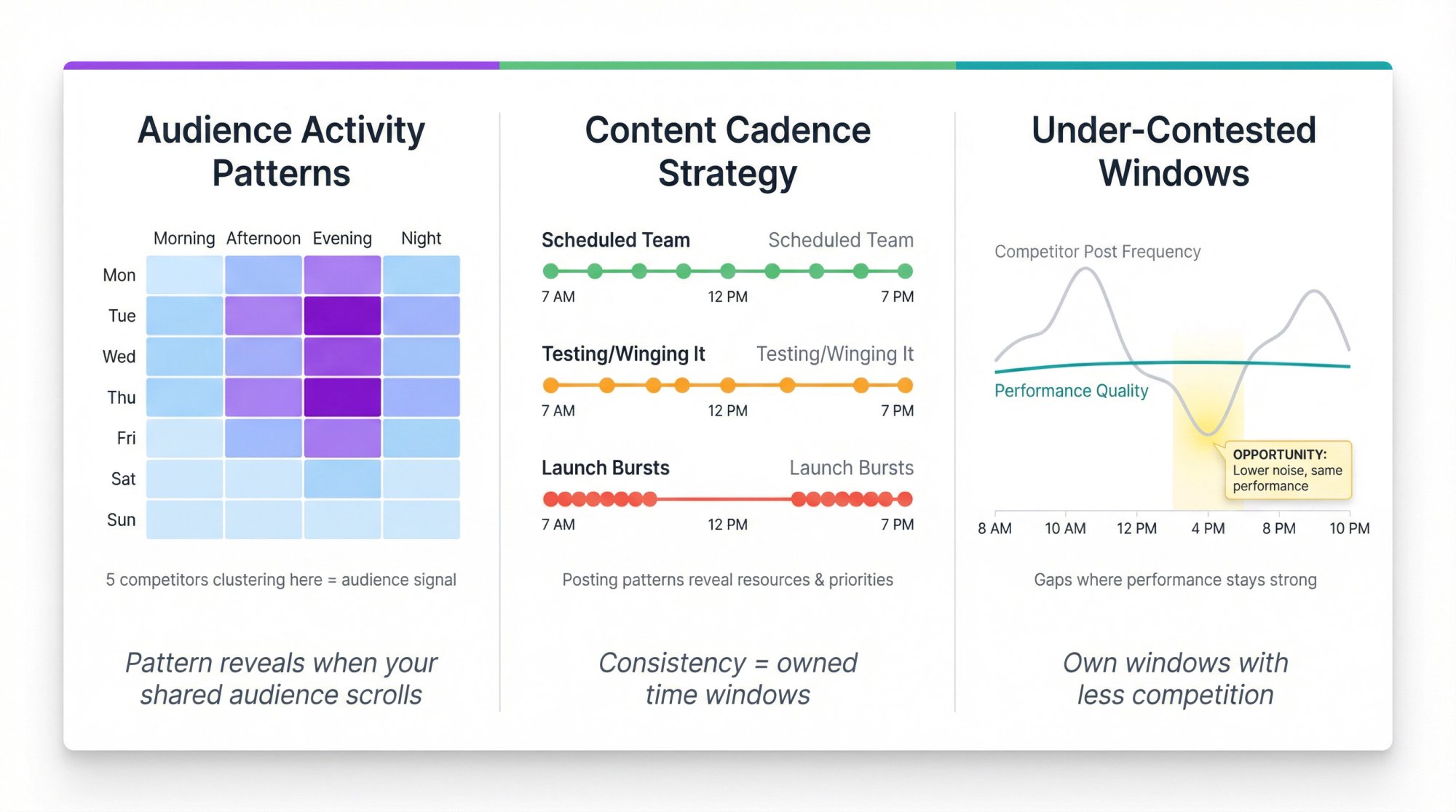
If five competitors in your niche all get their best engagement posting Tuesday and Thursday evenings, that's not coincidence. That's your audience telling you when they're available.
What's Their Content Cadence Strategy?
Posting patterns reveal resources and priorities:
• A competitor posting 3× daily at consistent times (7 AM, 12 PM, 7 PM) signals a dedicated content team with a schedule
• Random posting times and frequencies usually mean they're winging it or testing
• Sudden bursts (like 10 posts in 48 hours then silence) often precede launches
Are There Under-Contested Time Windows?
Sometimes you'll find time slots where competitors post less frequently but their performance stays strong. Those gaps are opportunities to own a window with less noise.
How to Choose Which Competitors to Track
Most teams track only brand competitors. That's a mistake.
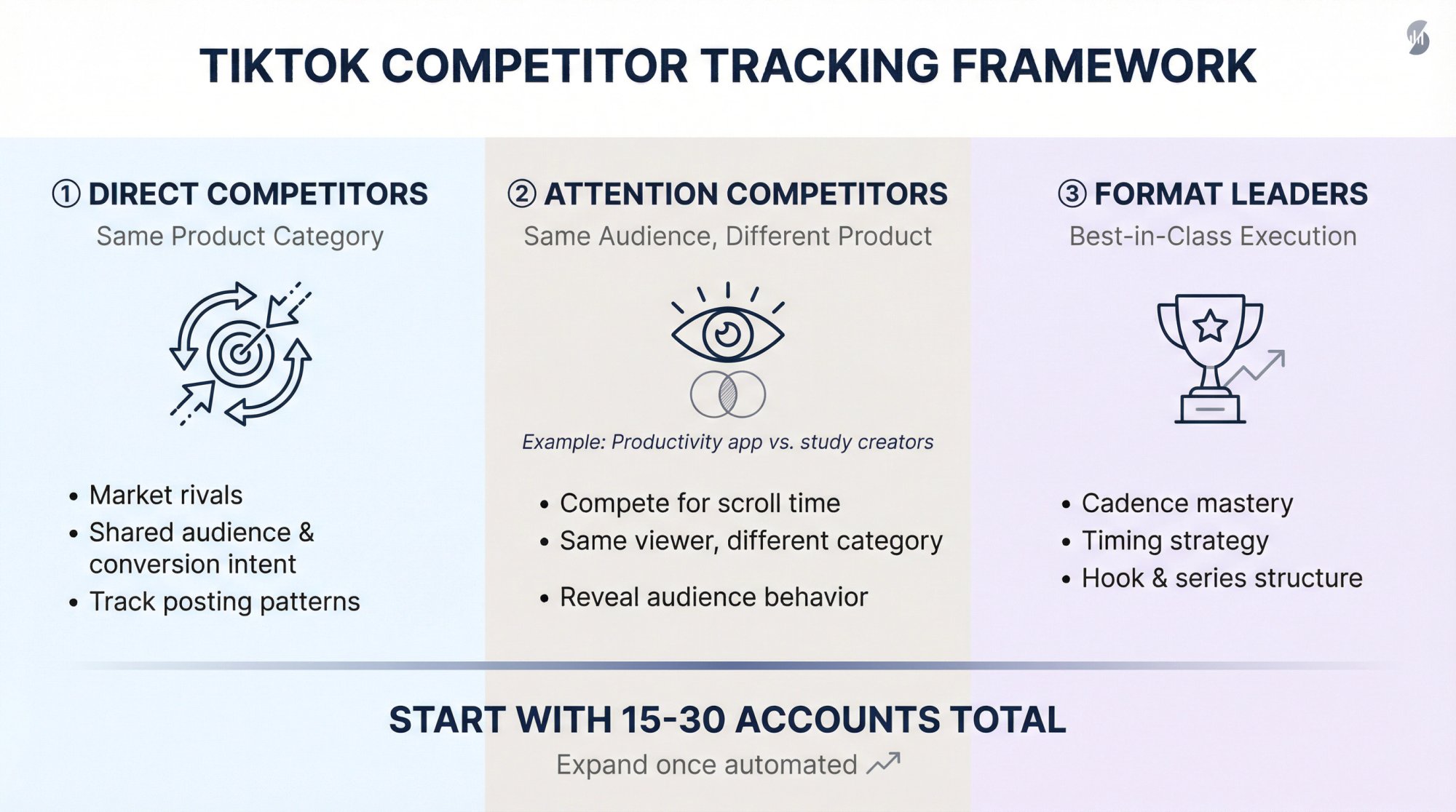
Create three buckets:
① Direct competitors (same product category)
These are your market rivals. Track their posting patterns because you share an audience and conversion intent.
② Attention competitors (same audience, different product)
Example: if you sell a productivity app, your TikTok attention competitors might be study creators, routine content, or "day in the life" accounts. They compete for the same scroll time even if they don't compete for purchases.
③ Format leaders (best-in-class execution regardless of category)
Even unrelated accounts can teach you about cadence, timing windows, series structure, and hook patterns that work on the platform.
Start with 15-30 accounts total. You can expand later once your system is automated with influencer tracking software.
How to Track TikTok Competitors Manually (Free Method)
How to Set Up TikTok Notifications for Competitors
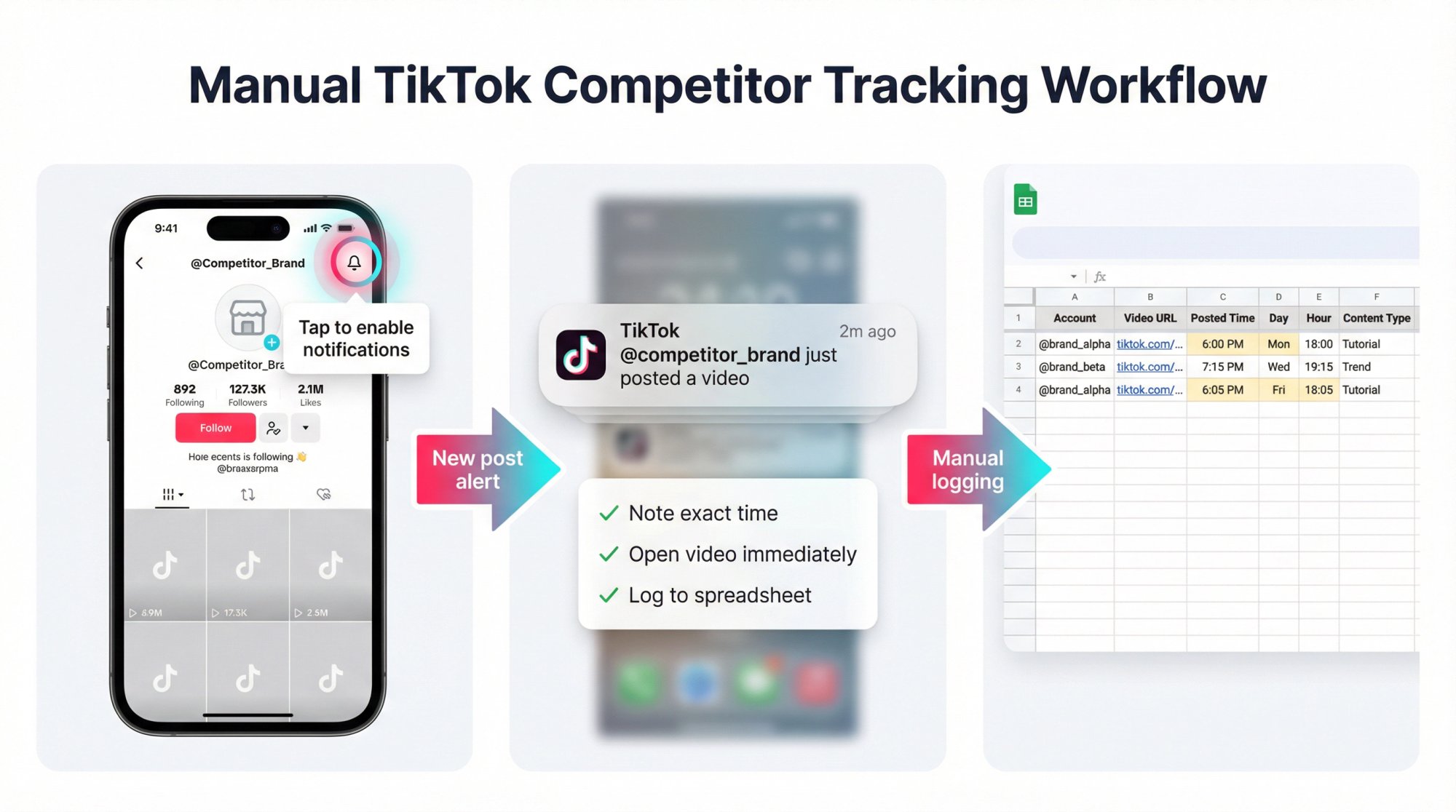
TikTok's notification system lets you get alerts when specific accounts post.
How to configure:
① Follow the competitor account
② Tap the bell icon on their profile
③ Enable "Posts" notifications (TikTok's muting features confirm you can control notifications per profile)
④ Check your phone settings (Settings > Notifications > TikTok on iPhone, similar path on Android) to ensure notifications are allowed
The creator won't know you enabled notifications. TikTok keeps this private.
Pro tip: Only enable this for your top 5-8 competitors. More than that and you'll drown in alerts.
When notifications arrive:
→ Note the exact time (timestamp matters)
→ Open the video and observe early engagement
→ Log it in a simple spreadsheet with columns for: Account, Video URL, Posted timestamp, Day of week, Hour, Content type
After 3-4 weeks, patterns emerge. One competitor might always post Monday/Wednesday/Friday at 6 PM. Another might favor weekend mornings.
The Limitation of Manual Tracking
This approach doesn't scale well and you'll miss posts if you're not vigilant. Plus you won't have historical data to compare month-over-month.
How to Build a Competitor Posting Dataset
If you want structured analysis without paying for tools yet, build this dataset manually.
Core Data Fields You Need to Track
| Field | Why it matters |
|---|---|
| Account name | Group and filter data |
| Video URL | Reference and creative review |
| Posted timestamp | Build timing analysis |
| Day of week | Detect weekly rhythm |
| Hour block | Identify posting windows |
| Content type | Separate formats (don't mix tutorials with trends) |
| Views at 24h | Early outcome signal |
| Views at 7d | Stabilized performance |
| Engagement rate | Normalize across account sizes |
Advanced Fields for Deeper Insights
| Field | Purpose |
|---|---|
| Series name | Track series posting schedules |
| Hook pattern | Correlate hooks with timing |
| CTA type | Separate reach posts from conversion posts |
| Launch marker | Distinguish normal cadence from campaign bursts |
Collect data for 30-60 days minimum. Tracking for a few weeks makes patterns start jumping out at you.
Best TikTok Analytics Tools for Competitor Tracking
Once you're tracking more than 10 competitors, manual logging breaks down. You need:
• Bulk account import
• Automatic post capture with timestamps
• Exportable data tables
• Posting schedule visualizations
• Alerts for new posts and viral threshold breaches
What Good Competitor Tracking Tools Provide
Automatic post logging
The tool records every new post with exact timestamps. No manual checking required.
Posting cadence analysis
Visual charts showing when accounts typically post (day-of-week heatmaps, hour-of-day patterns, frequency trends).
Performance correlation
Advanced tools show which posting times correlate with higher engagement for each competitor. This reveals if they're posting at their optimal times or just convenient times.
Alerts and notifications
Get Slack/Discord alerts when competitors post or when a post hits viral thresholds.
Historical data
Access months of past posting data to identify seasonal shifts and strategy changes with social media monitoring.
TikTok Competitor Tracking Tools Comparison
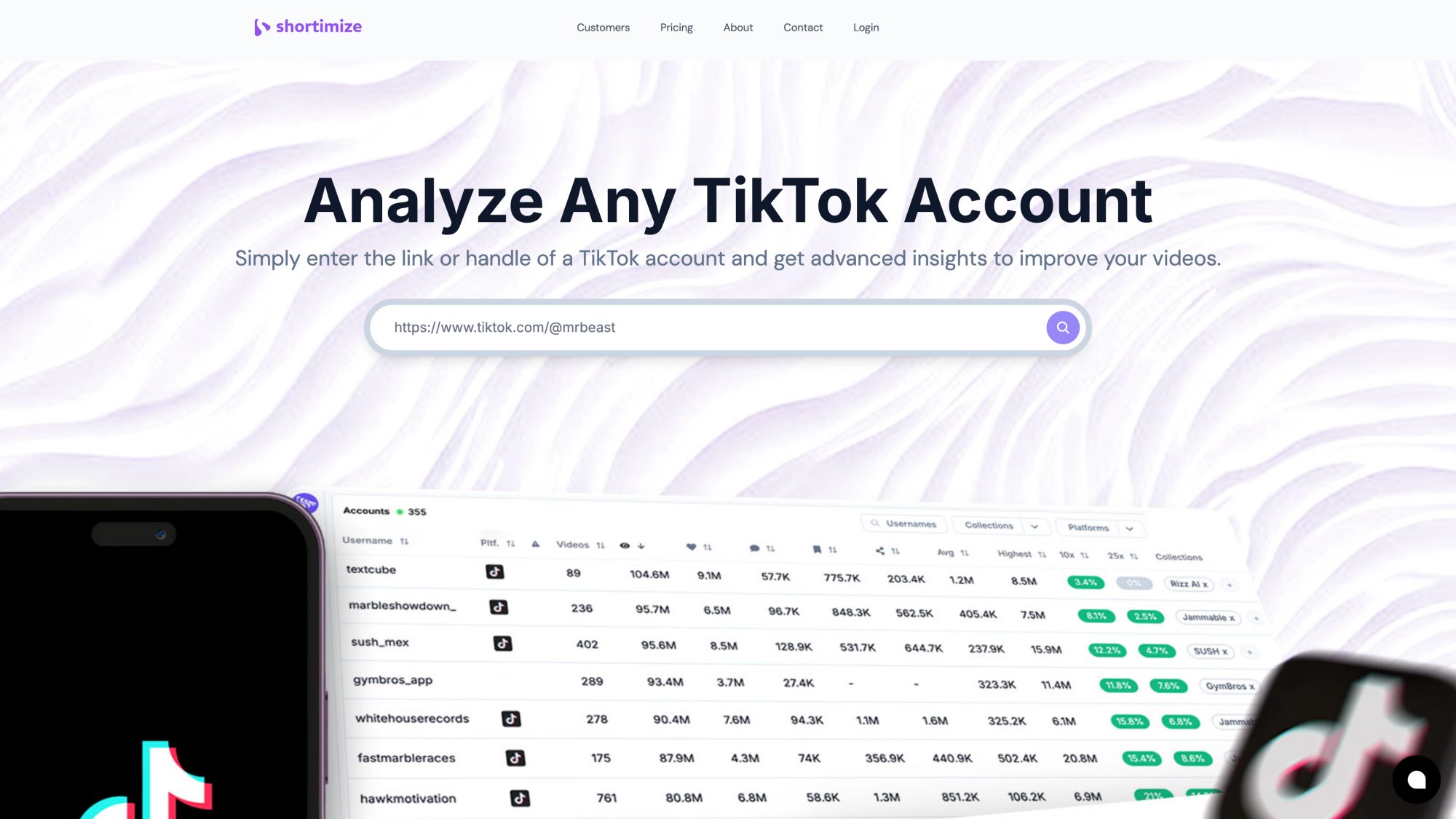
Shortimize is built specifically for cross-platform short-form video tracking. It handles TikTok, Instagram Reels, and YouTube Shorts in one dashboard.
For competitor timing intelligence:
→ Track any public TikTok account by pasting a URL
→ Automatic ingestion of all videos (past and future) with timestamps
→ Posting schedule visualizations that show when accounts publish and how performance varies by time
→ Collections feature to organize competitors into groups (direct competitors, format leaders, emerging challengers)
→ Data refreshes every 12-24 hours depending on plan (Business plan gets 12-hour refresh)
→ Export to CSV for custom analysis
→ Slack/Discord notifications when tracked accounts post new videos or hit viral milestones
→ API and webhooks on higher tiers for integration into your own systems
Pricing: $99/month (Pro plan, 1,000 videos), $249/month (Business plan, 5,000 videos), Enterprise custom. 7-day free trial available.
How to Choose the Right TikTok Analytics Tool
• If you need posting time tracking + alerts + exports across TikTok/Instagram/YouTube, Shortimize focuses on short-form video analytics
• If you need broad social benchmarking across many platforms, look at comprehensive analytics suites
• If you're TikTok-only, specialized TikTok analytics tools work well
Try free trials before committing. Most tools (including Shortimize) offer trials so you can test the interface and data quality.
How to Visualize Competitor Posting Patterns
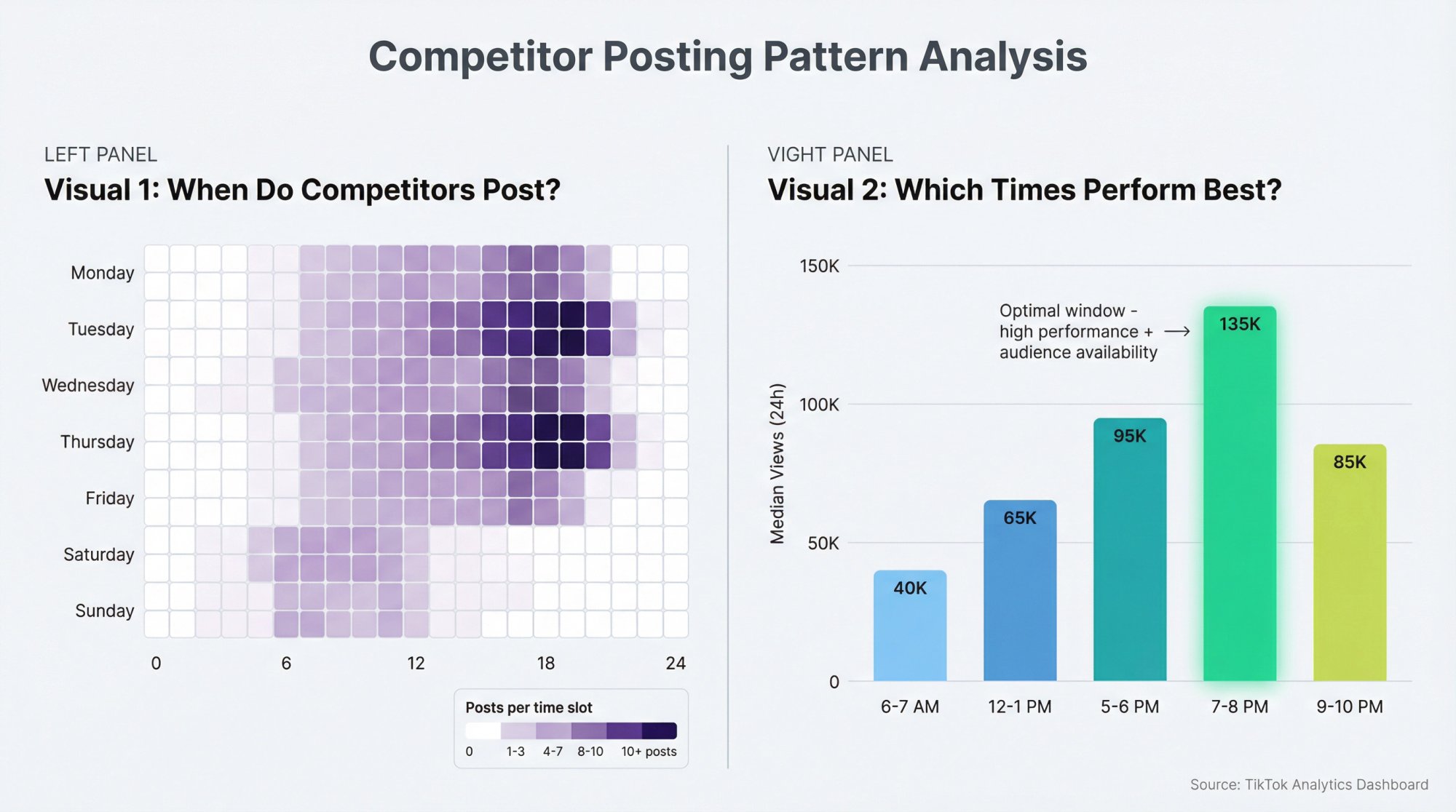
Visual 1: Cadence Heatmap (Day × Hour)
This grid answers "when do they typically post?"
| Structure Element | Description |
|---|---|
| Rows | Days of week (Monday through Sunday) |
| Columns | Hours (0-23) |
| Values | Count of posts per day/hour combination |
| Formatting | Color scale (white = no posts, dark = many posts) |
In Google Sheets:
① Add columns for DayOfWeek and Hour (extract from your timestamp data)
② Create a pivot table with rows = day of week, columns = hour, values = count of posts
③ Apply conditional formatting with a color scale
You'll see patterns immediately. Maybe Competitor A owns Monday/Wednesday evenings. Competitor B saturates weekend mornings.
Advanced version: Create one heatmap per major competitor, then create an aggregate "market heatmap" combining all competitors to see overall niche patterns.
Visual 2: Timing Performance Chart
This answers "which posting times actually perform well?"
How to build:
• Group posts by hour block (e.g. 6-7 AM, 7-8 AM, etc.)
• Calculate median views at 24h and 7d for each block
• Plot hour blocks on X-axis, median performance on Y-axis
This reveals the gap between when they post and when they should post. Often you'll find competitors posting frequently at sub-optimal times (because that's when their team is available) while under-using better windows.
That's where you can steal an advantage with TikTok competitor analysis.
How to Analyze Competitor Cadence Patterns
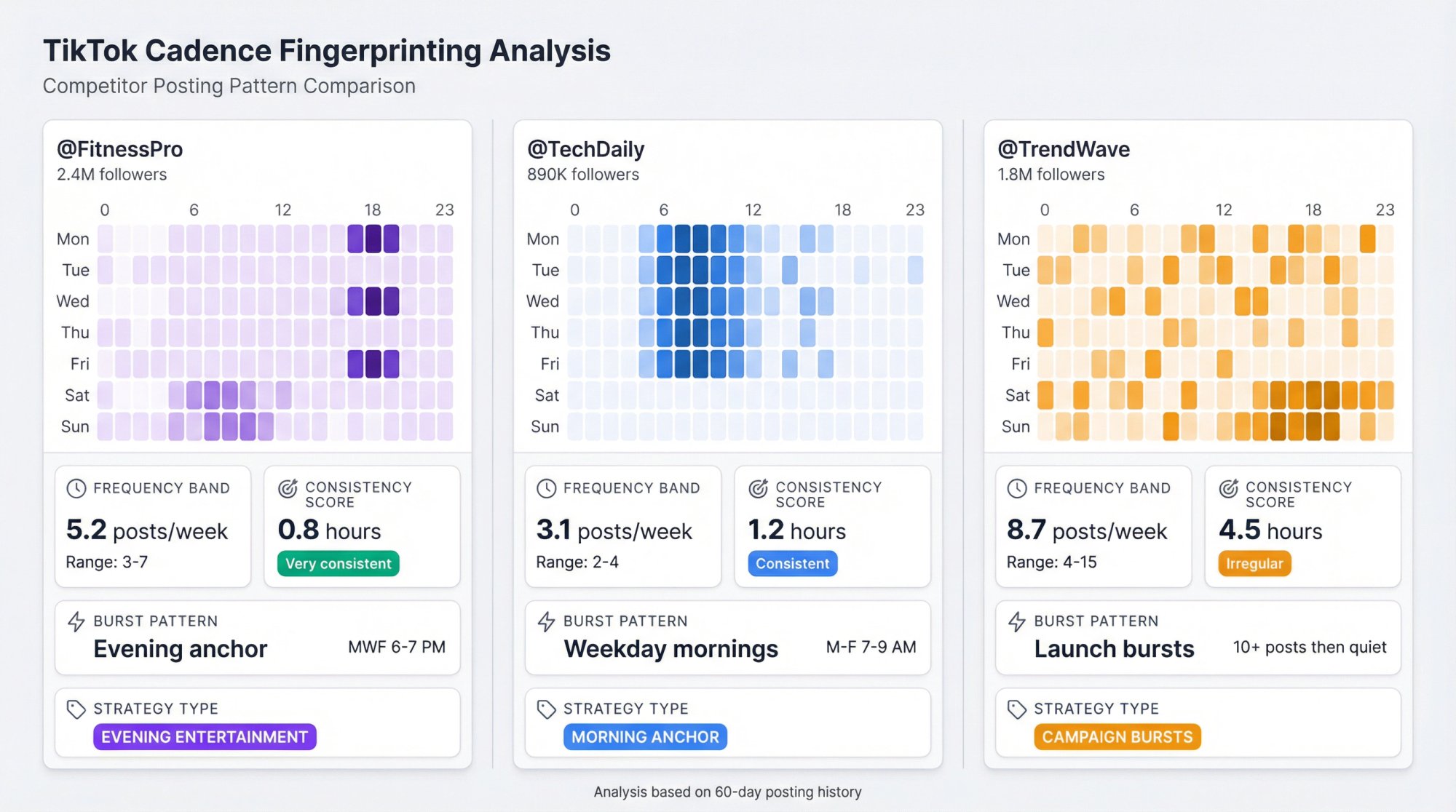
A cadence fingerprint is a one-page profile of how a competitor publishes.
For each major competitor, document:
| Element | What to Measure |
|---|---|
| Frequency band | Average posts per week + range (min to max) |
| Consistency score | Standard deviation of posting hour (lower = more consistent) |
| Burst pattern | Rhythm description (daily at 6 PM / 3 posts per day for 3 days / weekend heavy / random) |
| Timing strategy type | Label (morning anchor / lunch spike / evening entertainment / weekend dominant / launch bursts) |
Consistency score details:
How stable are their posting times?
Calculate standard deviation of posting hour across all posts. Lower deviation = more consistent schedule (they post at roughly the same times). Higher deviation = random or flexible schedule.
Timing strategy types:
• Morning anchor: posts every morning (6-9 AM)
• Lunch spike: midday posts (11 AM – 1 PM)
• Evening entertainment: posts 5-8 PM
• Weekend dominant: 60%+ of posts on weekends
• Launch bursts: irregular except during campaigns
Once you label competitors, their behavior becomes predictable through influencer tracking.
How to Turn Competitor Data Into Your Posting Schedule
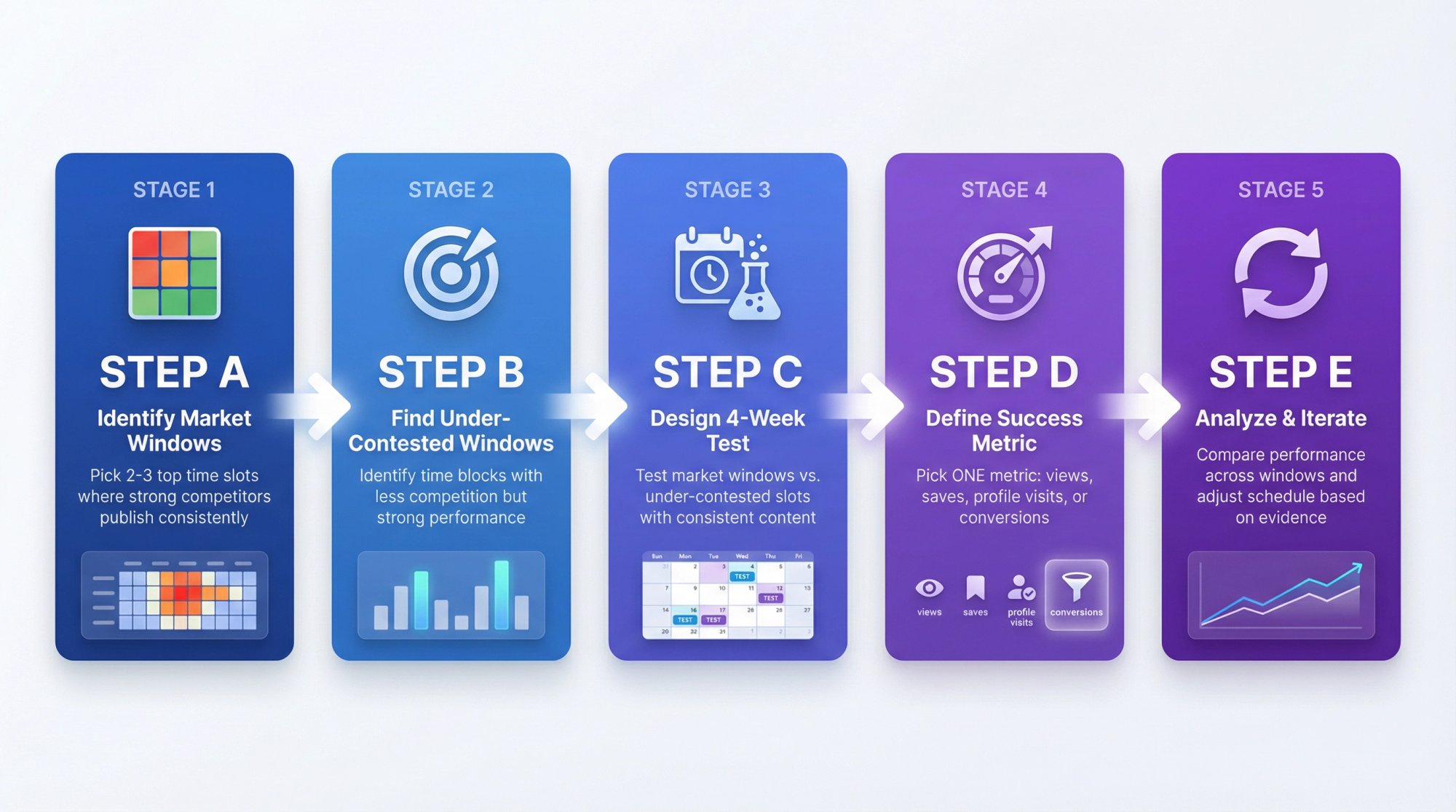
Here's the correct workflow:
Step A: Identify 2-3 "Market Windows"
From your aggregate heatmap, pick the top time slots where multiple strong competitors publish consistently.
These are validated windows. The audience is proven to be available.
Step B: Identify 1 "Under-Contested Window"
Find a time block where:
• Competitors post less frequently
• But their performance remains strong (median views high)
This is often the best opportunity. Less competition for distribution, but audience is still active.
Step C: Design a 4-Week Timing Experiment
| Week | Window | Type | Purpose |
|---|---|---|---|
| Week 1-2 | Window A | Market window (control) | Establish baseline |
| Week 3 | Window B | Under-contested | Test opportunity |
| Week 4 | Window C | Alternative market | Validate findings |
Critical: Keep creative format consistent across weeks (same series, same hook type). If you change both timing AND content, you won't know which variable drove results.
Step D: Define Your Success Metric
Pick ONE metric to evaluate:
• Median views at 24h
• Median saves per view
• Profile visits per view
• Conversions (if you have tracking)
Don't debate with multiple metrics. Commit to one.
Step E: Analyze and Iterate
After 4 weeks, compare performance across windows. Did Window B (the under-contested slot) outperform? Or did the market windows win for good reason?
Adjust your schedule based on evidence, not assumptions, using end-of-month TikTok analytics.
How to Set Up Alerts for Competitor Posts
Manual tracking fails when:
• Team members go on vacation
• Competitors post at unusual hours
• Strategy windows shift quickly
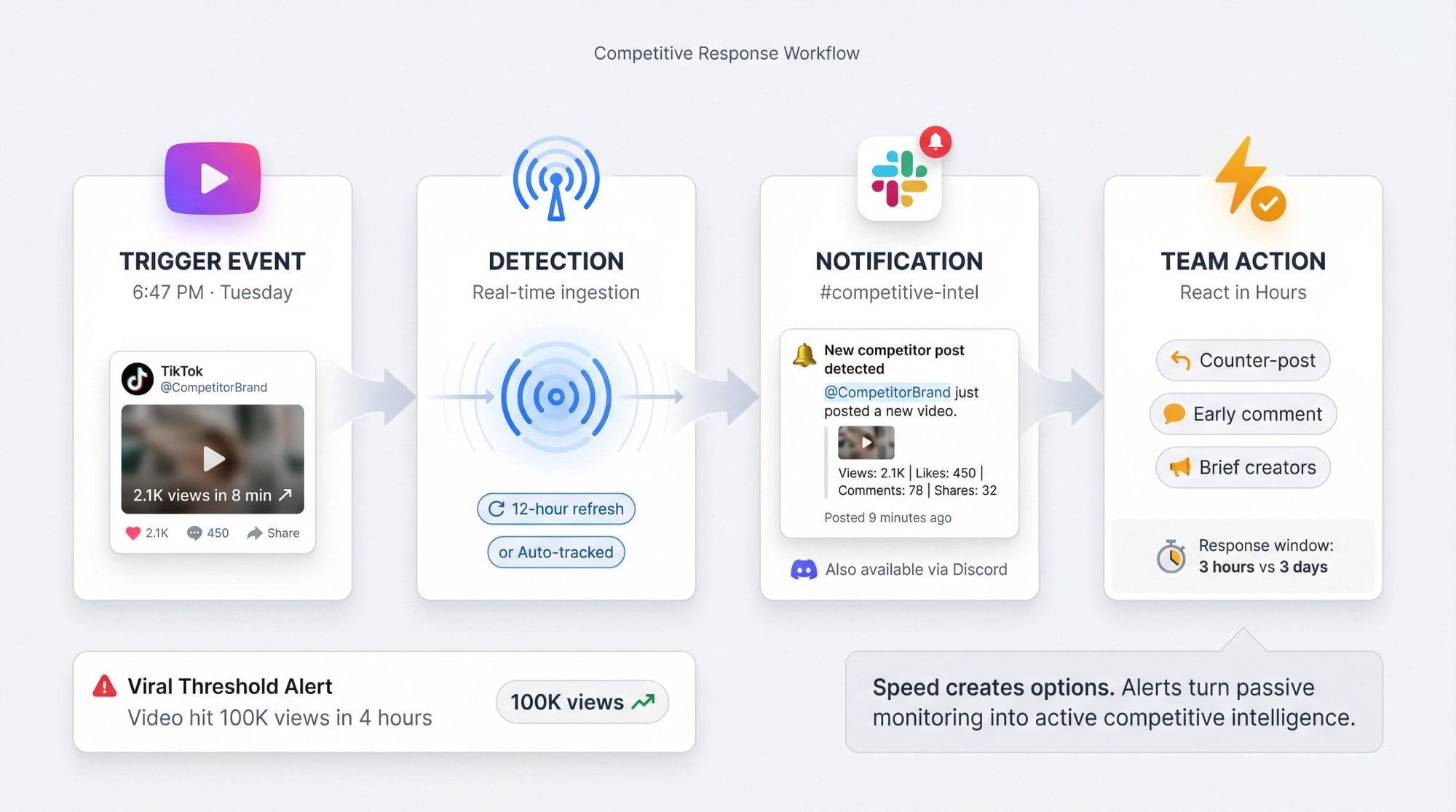
The Alerts You Need for Competitor Tracking
"Competitor posted a new video"
Get immediate notification so you can log timestamp and react if needed (counter-post, early comment, creative brief).
"Competitor video hit viral threshold"
Get alerted when a post crosses a performance milestone (100K views, 10K likes, etc.). This lets you analyze what worked while it's fresh.
Shortimize's influencer analytics supports both alert types via Slack/Discord notifications.
Why Real-Time Alerts Matter for TikTok Monitoring
Speed creates options. If a competitor drops a trend-jacking video that starts gaining traction, you want to know in hours (not days) so you can:
• Create your own version while the trend is hot
• Engage with their post (strategic commenting)
• Brief your creators immediately
Alerts turn passive monitoring into active competitive response.
How to Scale Competitor Tracking with Shortimize
If you're managing multiple brands, running an agency, or tracking 20+ accounts, here's the workflow that scales:
1. Track Competitor TikTok Accounts Automatically
Add competitor TikTok accounts to Shortimize by URL or handle. The system ingests all their public videos automatically.
Learn more about how to conduct TikTok competitor analysis.
2. Use Automated Posting Schedules Instead of Manual Checks
Shortimize generates posting schedule charts automatically. No eyeballing profiles, no logging times manually.
3. Organize Competitors Into Collections
Separate collections for:
→ Direct competitors (same product)
→ Emerging challengers (new entrants)
→ Format leaders (inspiration)
This keeps alerts relevant. You don't want viral alerts for every account. You want them for the ones that matter to specific campaigns or clients.
4. Push Intelligence Into Team Channels
Configure Slack or Discord notifications so when Competitor X posts, your growth team sees it in #competitive-intel immediately.
No one needs to check dashboards. The intelligence comes to you.
5. Keep Monitoring Current with Automatic Refresh
Shortimize refreshes data every 12-24 hours (depending on plan). New posts appear automatically. You're always working with current data.
Common Mistakes in Competitor Timing Analysis
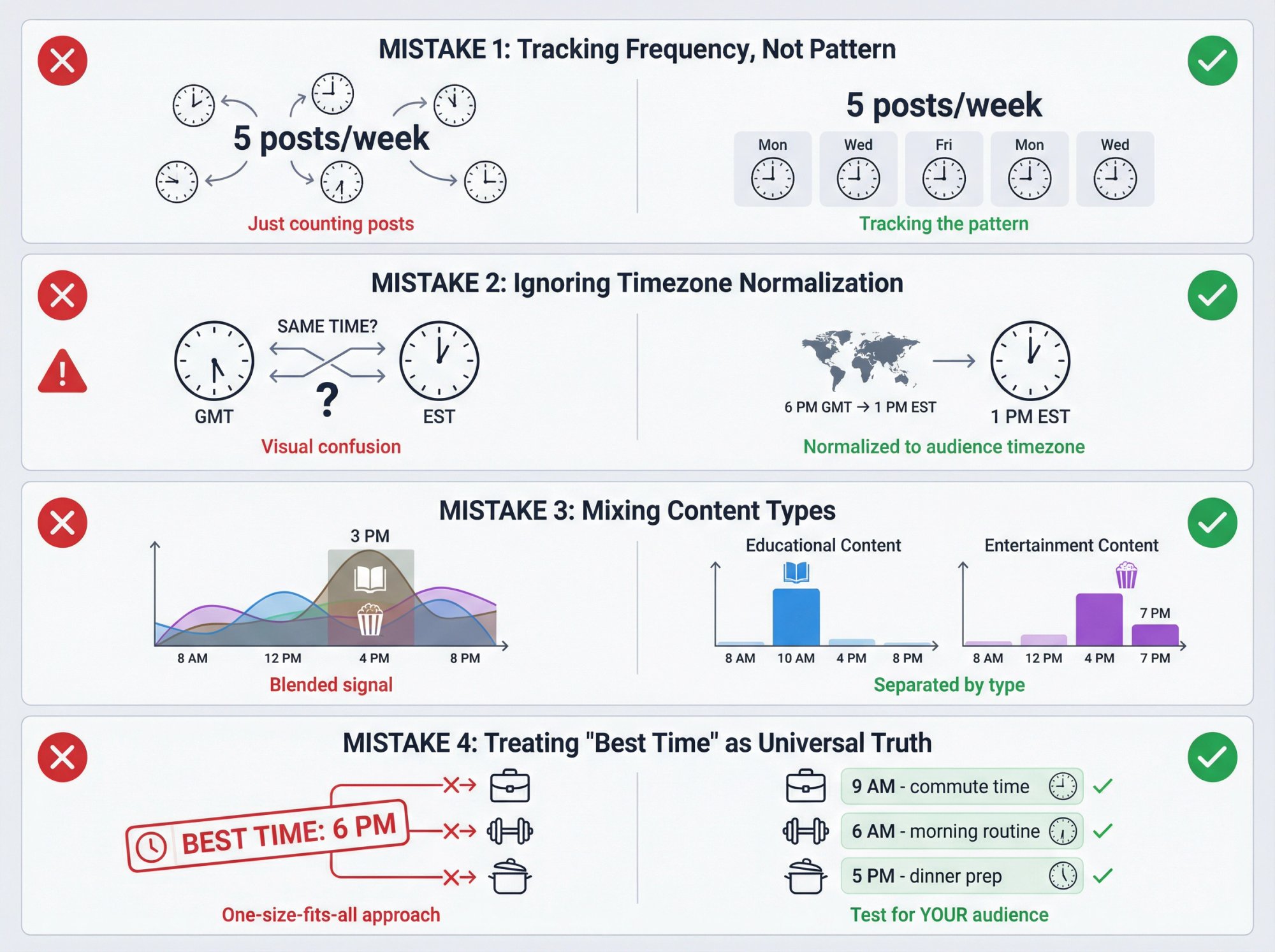
Mistake 1: Tracking Frequency, Not Pattern
Two accounts can both post 5× per week. One posts at 9 AM every weekday like clockwork. The other posts randomly whenever.
The first account owns a window. The second doesn't.
Pattern beats frequency.
Mistake 2: Ignoring Timezone Normalization
Always normalize timestamps to one consistent timezone (preferably your audience's core timezone or your ad account timezone).
Otherwise you'll think Competitor A posts at "6 PM" when that's actually 6 PM GMT and your audience is in EST.
Mistake 3: Mixing Content Types
A competitor might have:
• High-performing educational posts at 10 AM
• High-performing entertainment posts at 7 PM
If you blend them, the signal blurs. Separate content types in your TikTok analytics.
Mistake 4: Treating "Best Time to Post" as Universal Truth
The only "best time" is what performs for:
• Your audience
• Your content format
• Your current account distribution state
Competitors provide hypotheses to test. You still need to validate with your own data.
Using TikTok's API for Competitor Data
If you're thinking "we'll just use TikTok's API," understand the constraints.
TikTok's Research API does include create_time (UTC Unix timestamp for when videos were posted).
But access is restricted to qualified researchers in eligible regions with specific ethical review requirements.

For most growth teams, competitor timing data comes from:
• Public observation (watching profiles and logging posts)
• Third-party tools (like Shortimize) that collect publicly available data
This is standard competitive intelligence. You're analyzing public information, not accessing private data.
Frequently Asked Questions
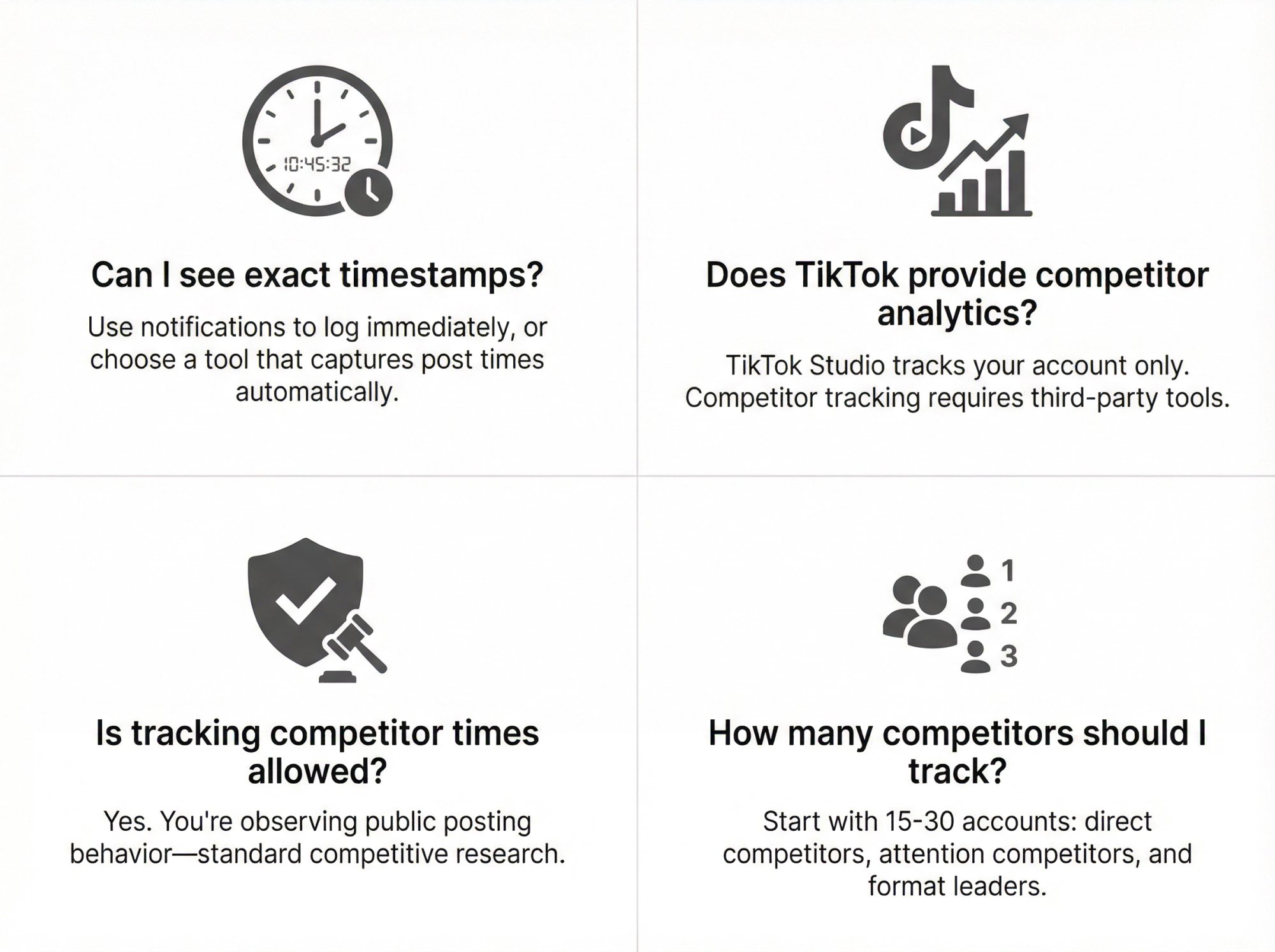
Can I see the exact time a competitor posted on TikTok?
Sometimes you'll only see relative time ("3 hours ago") in the app. For exact timestamps, either:
• Log immediately when you get notifications
• Use a tool that captures post timestamps automatically
Does TikTok provide competitor analytics natively?
TikTok Studio (formerly TikTok Creator Tools) provides analytics for your account, including scheduling and performance data.
But competitor tracking requires external observation or third-party analytics tools.
Is tracking competitor posting times allowed?
Yes. You're observing public posting behavior, which is standard competitive research.
Avoid invasive tactics (don't try to access private data or use unauthorized scrapers). Stick to public information and compliant tools.
How many competitors should I track?
Start with 15-30 accounts:
• 5-10 direct competitors
• 5-10 attention competitors (same audience, different category)
• 5-10 format leaders (best execution regardless of niche)
Expand only after you automate with social media monitoring tools.
90-Minute Implementation Plan to Start Today
Here's how to get operational this week:
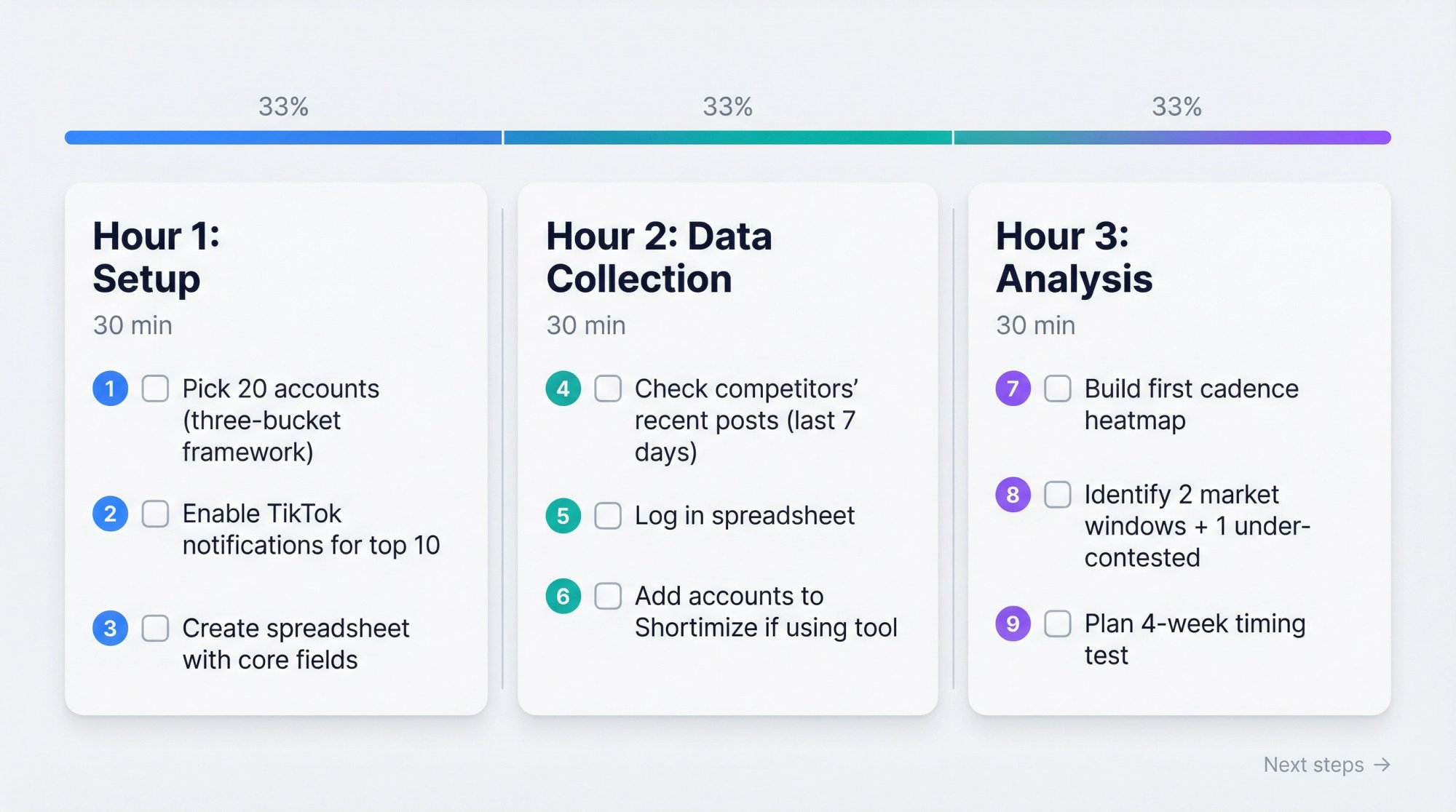
| Phase | Time | Tasks |
|---|---|---|
| Hour 1: Setup | 30 min | ① Pick 20 accounts (three-bucket framework) |
| ② Enable TikTok notifications for top 10 | ||
| ③ Create spreadsheet with core fields | ||
| Hour 2: Data Collection | 30 min | ④ Check competitors' recent posts (last 7 days) |
| ⑤ Log in spreadsheet | ||
| ⑥ Add accounts to Shortimize if using tool | ||
| Hour 3: Analysis | 30 min | ⑦ Build first cadence heatmap |
| ⑧ Identify 2 market windows + 1 under-contested | ||
| ⑨ Plan 4-week timing test |
Next steps:
• Run your timing experiment for 4 weeks
• Add alerts so you stop missing posts
• Review patterns monthly (competitor strategies shift)
Why Shortimize Is Built for Competitor Intelligence
We built Shortimize because manually tracking competitor activity across TikTok, Instagram, and YouTube doesn't scale.
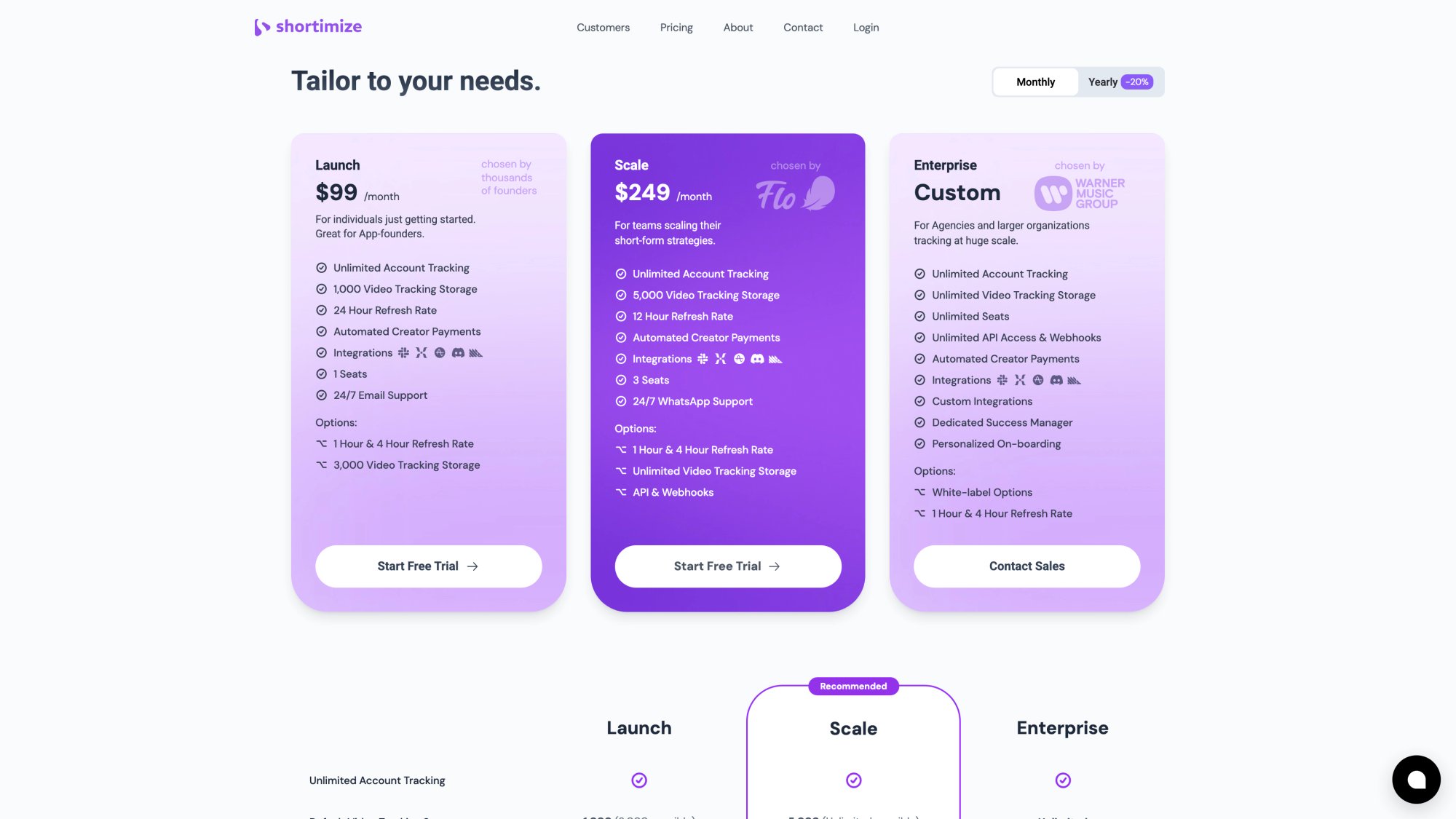
What makes Shortimize different for posting time analysis:
① Cross-platform tracking
Monitor TikTok, Instagram Reels, and YouTube Shorts in one dashboard. See if competitors have different timing strategies per platform.
② Automatic posting schedules
Analyze any TikTok account and see their full posting history, schedule patterns, and performance by time of day.
③ Collections for organization
Group competitors into sets. Track them side-by-side. Compare posting frequencies and windows.
④ Real alerts
Slack and Discord notifications when competitors post or go viral. React fast.
⑤ Exportable data
CSV exports for custom analysis. API/webhooks on Business and Enterprise plans.
⑥ Fast refresh cycles
12-hour data refresh on Business plan. You're always working with current intelligence.
⑦ 7-day free trial
Test the system with your actual competitors before committing.
Start tracking competitors on Shortimize
Final Thoughts
Tracking when competitors post on TikTok isn't about copying their schedule. It's about understanding audience availability patterns and spotting strategic opportunities.
The teams that win aren't the ones who post at "the best time" (which doesn't exist). They're the teams who:
• Know when their audience is available
• Identify under-contested windows
• Test systematically
• React fast to competitor moves
Start small. Pick 15-20 accounts. Set up notifications or a tracking tool. Log data for a month.
You'll see patterns. Test them. Iterate.
Competitor timing intelligence is one piece of a larger system (you still need great creative, strong hooks, and distribution strategy). But it's a piece that separates teams who guess from teams who know.
Build the system. Run the tests. Own your windows.